
Using Statistics to show view count
In a current project I’m working on we needed a page view count. I first thought about making my own DDS table and add count values to that. But then I though about the Statistic tab in edit mode in EPiServer. What I wanted to do was to get the page count from that
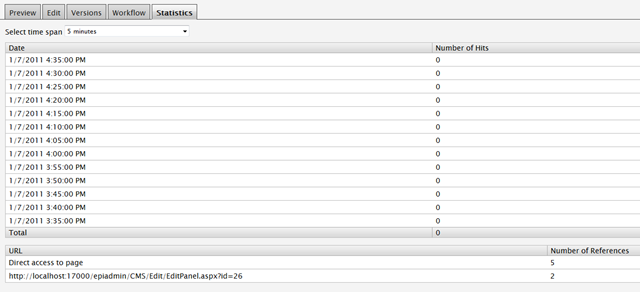
Did some Google search about how this and did only find one forum post that pointed me in the right direction.
This code
- DateTime start = DateTime.Now;
- TimeSpanQuery timeSpanQuery = new TimeSpanQuery();
- timeSpanQuery.Root = ((ITransformer)ClassFactory.CreateInstance(typeof(ITransformer), new object[0])).CreateURL(base.CurrentPage.PageLink.ID);
- timeSpanQuery.Interval = 5;
- timeSpanQuery.Stop = DateTime.Now;
- timeSpanQuery.Start = DateTime.Now.AddYears(-4);
- TimeSpanAnalyzerView view = new TimeSpanAnalyzerView();
- Uri address = new Uri("soap.tcp://localhost/TimeSpanAnalyzerView");
- Uri via = new Uri(VirtualPathUtility.AppendTrailingSlash(Settings.Instance.LogServiceUrl.ToString()) + "TimeSpanAnalyzerView");
- view.Destination = new EndpointReference(address, via);
- var data = view.GetHits(timeSpanQuery);
results in these 3 tables
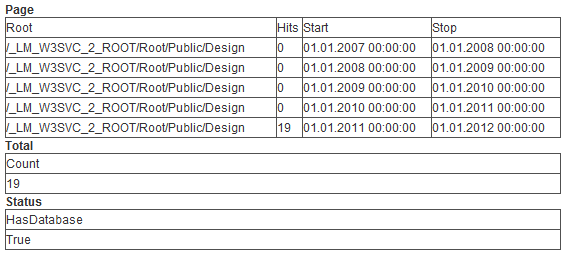
and its the first part of the statistic tab information
And this code
- RealTimeAnalyzerView view = new RealTimeAnalyzerView();
- Uri address = new Uri("soap.tcp://localhost/RealTimeAnalyzerView");
- Uri via = new Uri(VirtualPathUtility.AppendTrailingSlash(Settings.Instance.LogServiceUrl.ToString()) + "RealTimeAnalyzerView");
- view.Destination = new EndpointReference(address, via);
- ITransformer transformer = (ITransformer)ClassFactory.CreateInstance(typeof(ITransformer), new object[0]);
- DataSet data=view.Referrers(transformer.CreateURL(base.CurrentPage.PageLink.ID));
results in

that is the last part. There are other information that can be retrieved.
- data = view.LatestUsers(transformer.CreateURL(base.CurrentPage.PageLink.ID));
results in
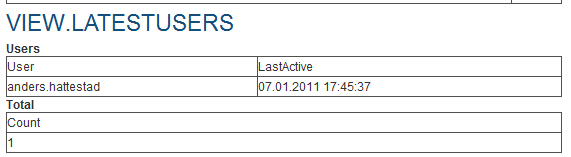
and the
- data = view.GetMaxHits(transformer.CreateURL(base.CurrentPage.PageLink.ID));

Here you will default get max 5 elements if you not change EPnMostVissitPagesMaxCount in the C:\Program Files (x86)\EPiServer\Shared\Services\Log Service\EPiServer.LogService.exe.config
- <sendListener type="EPiServer.Log.Analyzer.RealTimeAnalyzer, EPiServer.Log.Analyzers" method="StoreMessage">
- <!-- The view for the analyzer -->
- <view type="EPiServer.Log.Analyzer.RealTimeAnalyzerView, EPiServer.Log.Analyzers" protocol="TCP/SOAP" endpoint="soap.tcp://localhost/RealTimeAnalyzerView"/>
- <!-- Maximum pages in the published pages queue -->
- <EPnPublishedPagesMaxCount>5</EPnPublishedPagesMaxCount>
- <EPnMostVissitPagesMaxCount>100</EPnMostVissitPagesMaxCount>
- </sendListener>
It can seems that the TimeSpanAnalyzerView methods persists and that the RealTimeAnalyzerView is cleared when the server resets. So if you want to have a count of how many times users have accessed on page this is the code that will return that
- TimeSpanQuery timeSpanQuery = new TimeSpanQuery();
- timeSpanQuery.Root = ((ITransformer)ClassFactory.CreateInstance(typeof(ITransformer), new object[0])).CreateURL(base.CurrentPage.PageLink.ID);
- timeSpanQuery.Interval = 5;
- timeSpanQuery.Stop = DateTime.Now;
- timeSpanQuery.Start = DateTime.Now.AddYears(-4);
- TimeSpanAnalyzerView view = new TimeSpanAnalyzerView();
- Uri address = new Uri("soap.tcp://localhost/TimeSpanAnalyzerView");
- Uri via = new Uri(VirtualPathUtility.AppendTrailingSlash(Settings.Instance.LogServiceUrl.ToString()) + "TimeSpanAnalyzerView");
- view.Destination = new EndpointReference(address, via);
- var data = view.GetHits(timeSpanQuery);
- string nrofVisits = "";
- if (data != null && data.Tables["Total"] != null && data.Tables["Total"].Rows.Count > 0)
- nrofVisits = "" + data.Tables["Total"].Rows[0][0];
- if (nrofVisits != "")
- NrOfUnikVisits.Text = string.Format(NrOfUnikVisits.Text, nrofVisits);
- <asp:Literal ID="NrOfUnikVisits" runat="server" Text="{0} visninger" EnableViewState="false" />

I used this for ranking the top visited pages as you might have gathered from the forum thread. However, apparently this functionality is being deprecated in a future version of EPiServer, or have I been misinformed?