
Auto Translation V2 to V3 migration
Api V3 has came out.
Microsoft has migrated auto translation service api from V2 to V3 in the beginning of this year.
Version 2 was deprecated on April 30, 2018 and will be discontinued on April 30, 2019 according to Microsoft announcement here
Episerver's Language Manager add-on was updated in response to that and released in version EPiServer.Labs.LanguageManager 3.3.0.
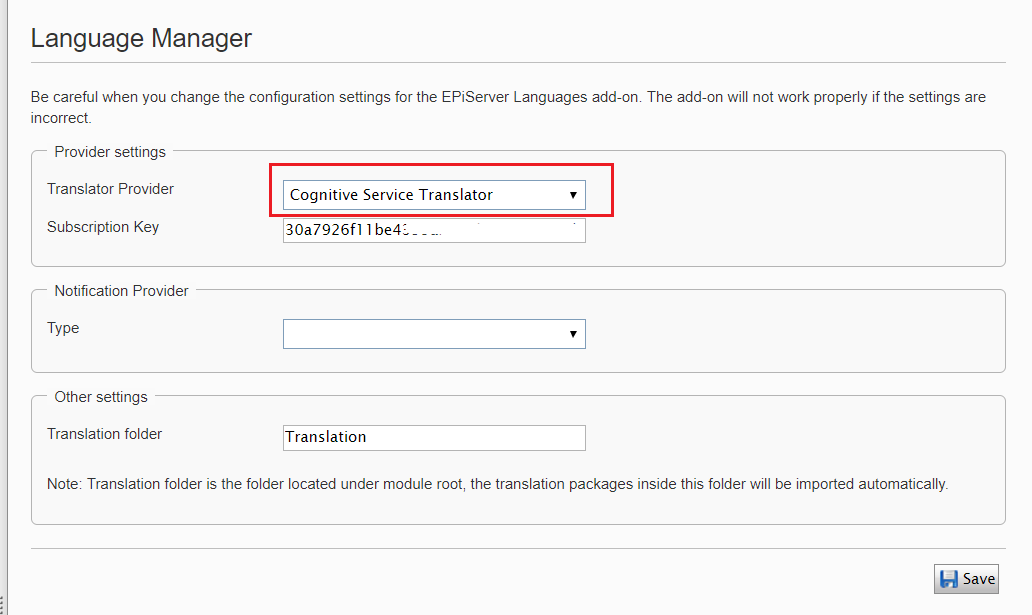
The upgraded auto translation service's name is changed to "Cognitive Service Translation" (was "Bing Translator" before) with new api endpoint: api.cognitive.microsofttranslator.com.
Microsoft also introduces service improvements in V3:
- Is generally available and fully supported.
- Is GDPR compliant as a processor and satisfies all ISO 20001 and 20018 as well as SOC 3 certification requirements.
- Allows you to invoke the neural network translation systems you have customized with Custom Translator (Preview), the new Translator NMT customization feature.
- Does not provide access to custom translation systems created using the Microsoft Translator Hub.
Authentication
The V3 api will accept authentication key of V2, so you don't need to get a new subscription that make it easier for you to migrate to new version without breaking anything.
How to update Episerver's Language Manager package?
These updates were released in package EPiServer.Labs.LanguageManager 3.3.0. So, all you need to do is to update this package, then go to Language Manager settings change provider to "Cognitive Service Translation".
All behaviors should remain the same.
Hope you guys find this info useful. Thanks!
Comments