

 Certification.png "Commerce Connect 14 Developer (Expert) Certification")


Working with product recommendations - Wishlist Recommendations
One of the useful features of Optmizely personalized contents is Product Recommendations. With Optimizely Product Recommendations, you can provide a personalized shopping experience for visitors to your e-commerce website. Personalization is based on website interaction such as order history, visitor profiles, and intelligent algorithms to suggest products of interest. A developer must first configure the tracking, personalization service, and recommendation widgets, then you can start working with Product Recommendations to define recommendations strategies using the Personalization Portal.
A couple of days ago we integrated a widget for wishlist, Where users would see product recommendation based on their wishlist history. Below are the steps how you can do it step by step. This is the same configuration you can follow to create other widgets.
Step 1 - Login to Personalization portal > Product Recommendations > Widgets > Create a new widget
For us this was wishlistWidget we needed on wishlist page.
Step 2 - Configure the type of recommendations you would like to display on your website
The algorithms are set to show Popular only 3 recommendations. That way it would show us only 3 product recommendations.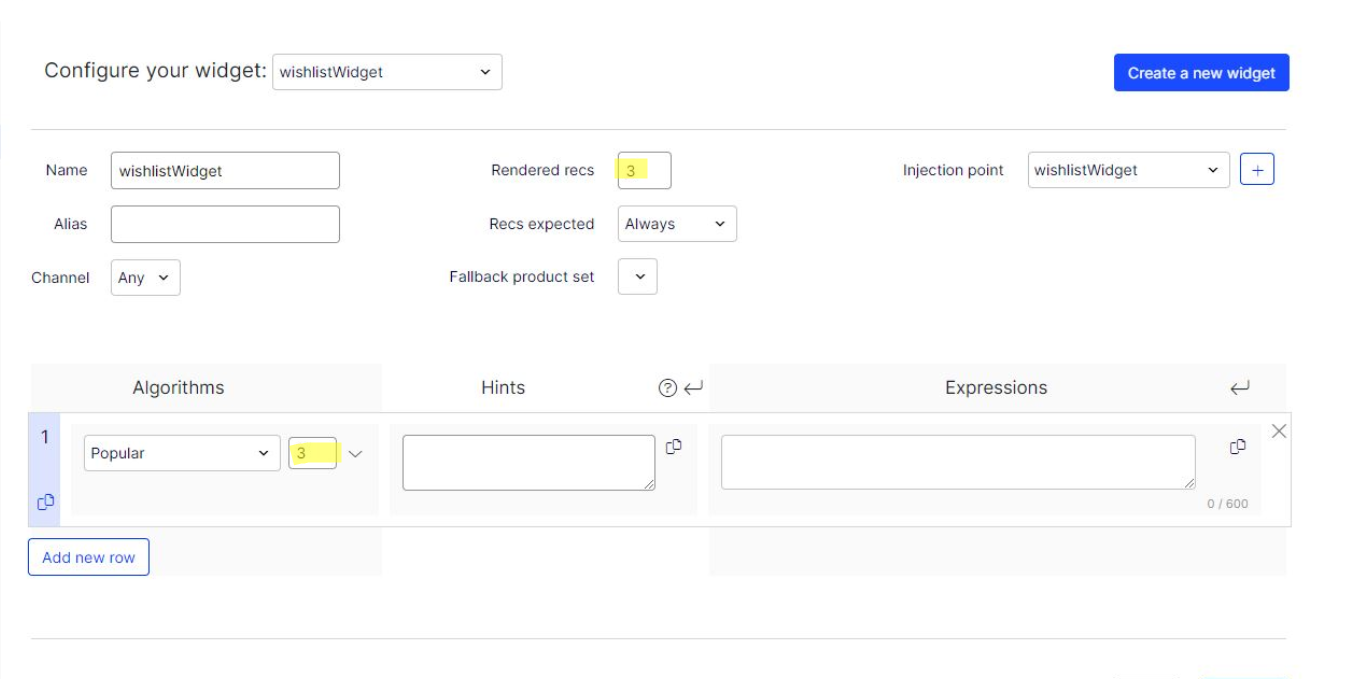
Code > Wishlist > enable tracking
private readonly TrackingDataFactory _trackingDataFactory;
private readonly ITrackingService _trackingService;
private readonly ServiceAccessor<IContentRouteHelper> _contentRouteHelperAccessor;

public async Task<TrackingResponseData> TrackWishlist(HttpContextBase httpContext)
{
      var trackingData = _trackingDataFactory.CreateWishListTrackingData(httpContext);

      return await InternalTrackAsync(trackingData, httpContext);
}

private async Task<TrackingResponseData> InternalTrackAsync(CommerceTrackingData commerceTrackingData, HttpContextBase httpContext)
{
	if (commerceTrackingData == null || httpContext == null)
	{
		return null;
	}

	var scope = _trackingDataFactory.GetCurrentTrackingScope();

	if (!string.IsNullOrEmpty(scope))
	{
		return await _trackingService.TrackAsync(commerceTrackingData, httpContext, _contentRouteHelperAccessor().Content, scope);
	}
	else
	{
		return await _trackingService.TrackAsync(commerceTrackingData, httpContext, _contentRouteHelperAccessor().Content);
	}
}
Next > Get recommendations
using EPiServer.Personalization.Commerce.Tracking;

public static IEnumerable<Recommendation> GetRecommendations(this TrackingResponseData response, ReferenceConverter referenceConverter, string area) => response.GetRecommendationGroups(referenceConverter)
									.Where(x => (!string.IsNullOrEmpty(area) && x.Area.IsEqual(area))
									|| string.IsNullOrEmpty(area))
									.SelectMany(x => x.Recommendations);
This will fetch you configured recommendations on personlization portal. Similarly we can get recommendations wherever required.
Here is the useful resource for enabling tracking for wishlist in commerce - https://github.com/episerver/Quicksilver/blob/master/Sources/EPiServer.Reference.Commerce.Site/Features/Cart/Controllers/WishListController.cs
Thank you for reading.

Comments