
Update/Get Insights DATA based on Profile ID.
Episerver Insight is the user interface for adding/updating visitor profile, you can add Custom User groups to Epi insights data to be able to personalize the components on the website based on User Visitor roles in Epi. Below are the steps to Update the payload data in Epi Insights, Below are the pre-reqs that are needed to get started, Swagger URL and Profile Store key which we can get from Epi server.
Example of Swagger URL:- https://profilesapi-westus01.profilestore.episerver.net/swagger/
Profile Store Key:- Encoded Shared Key.
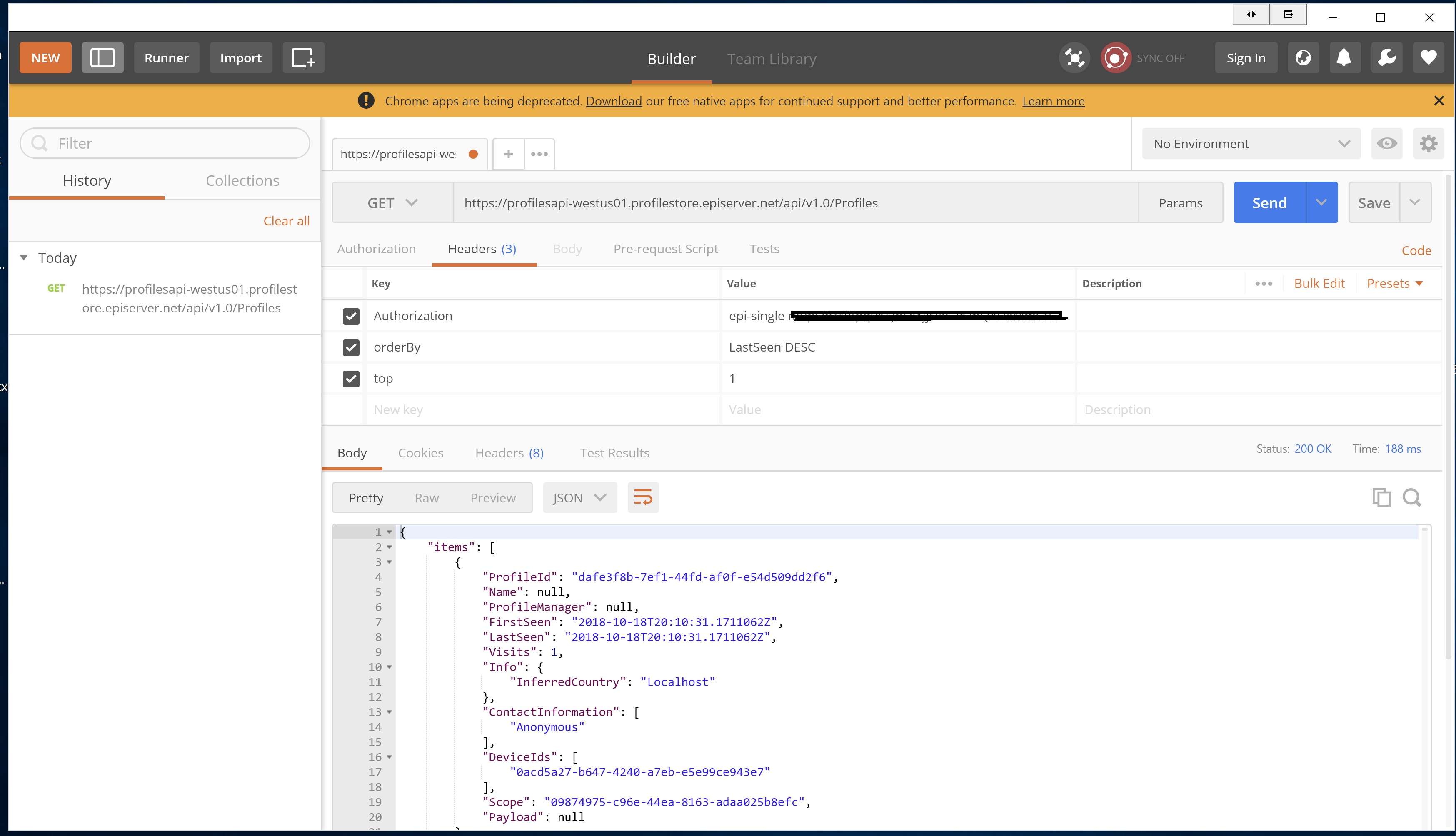
Below is how we look at the data in swagger or postman and we can compare that to EpiInsights data,


a) Create Profile Class with the JSON object.
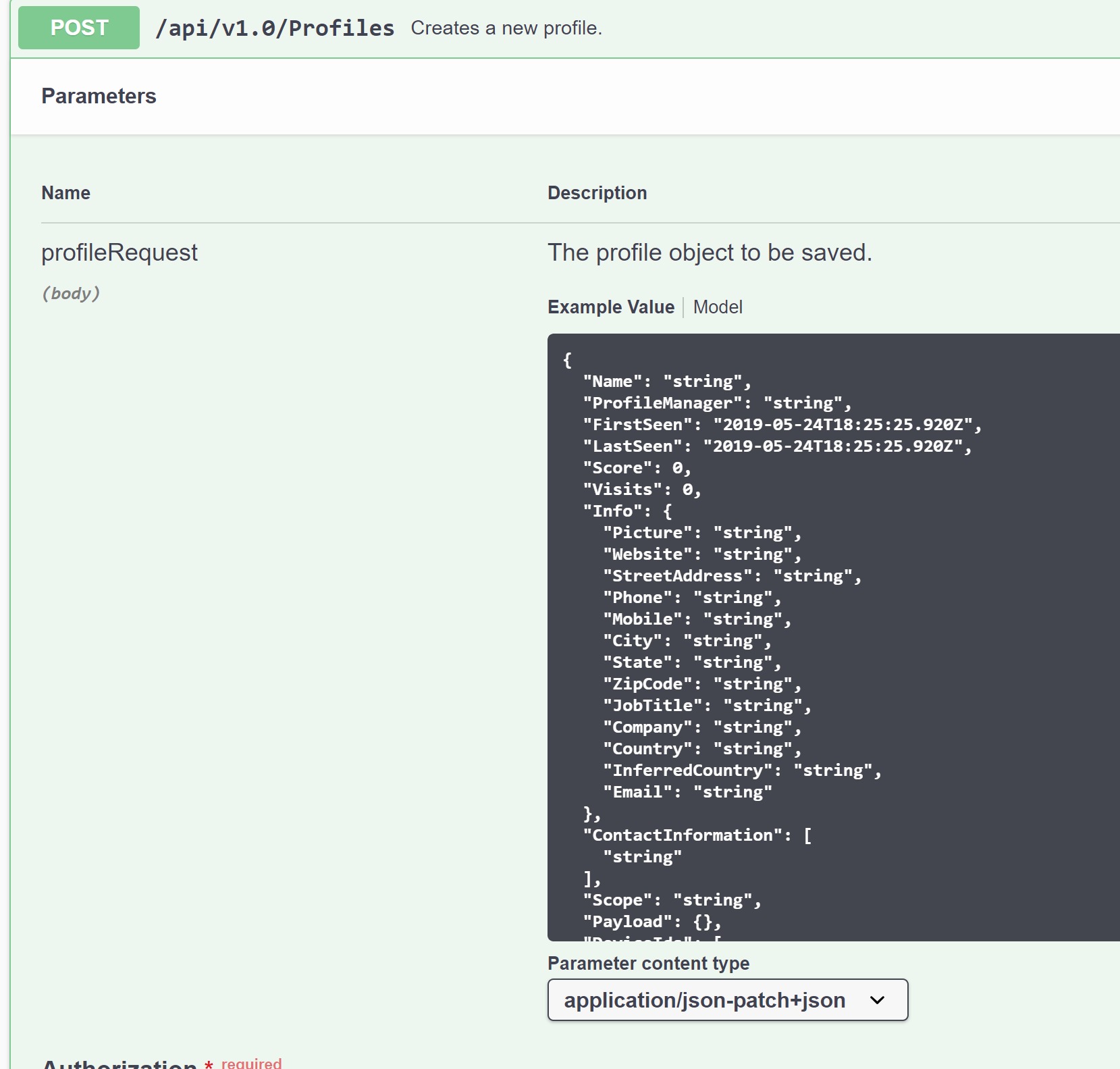
Example of JSON object from Swagger
public class ProfileData
{
public class Rootobject
{
public string ProfileId { get; set; }
public string Name { get; set; }
public string ProfileManager { get; set; }
public DateTime FirstSeen { get; set; }
public DateTime LastSeen { get; set; }
public int Score { get; set; }
public int Visits { get; set; }
public Info Info { get; set; }
public string[] ContactInformation { get; set; }
public string Scope { get; set; }
public Payload Payload { get; set; }
public string[] DeviceIds { get; set; }
}

public class Info
{
public string Picture { get; set; }
public string Website { get; set; }
public string StreetAddress { get; set; }
public string Phone { get; set; }
public string Mobile { get; set; }
public string City { get; set; }
public string State { get; set; }
public string ZipCode { get; set; }
public string JobTitle { get; set; }
public string Company { get; set; }
public string Country { get; set; }
public string InferredCountry { get; set; }
public string Email { get; set; }
}

public class Payload
{
//Payload Custom Parameters
public string HomePhone { get; set; }
public string HomePhone2 { get; set; }
public string UserGroups { get; set; }
}
b) Get the Insights Profile based on Name/Email or Profile ID Guid
String profileId = "profile id from Epi";

String authSecurityKey = "security key";
private String profileApi = "profile API URL";
String scopeId = SiteDefinition.Current.Id.ToString().ToLowerInvariant();
using (var client = new HttpClient())
{
client.BaseAddress = new Uri(profileApi);
client.DefaultRequestHeaders.Authorization = new AuthenticationHeaderValue("epi-single", authSecurityKey);
var responseTask = client.GetAsync(String.Format("/api/v1.0/Profiles/{0}/{1}", scopeId, profileId));
responseTask.Wait();

var result = responseTask.Result;
if (result.IsSuccessStatusCode)
{

using (HttpContent content = result.Content)
{

var readTask = result.Content.ReadAsAsync<ProfileData.Rootobject>();
readTask.Wait();
//getProfileData is the profile of an existing profile.
var getProfileData = readTask.Result;


}
}
}
c) Update Payload Data with Custom Objects. Pass the profile data from step b to step c.
using (var client = new HttpClient())
{
//updating the payload data with custom parameters
getProfileData.Payload = new ProfileData.Payload { HomePhone = "xxx-xxx-xxxx", HomePhone2 = "xxx-xxx-xxxx", UserGroups = "Add This Dynamically" };
client.BaseAddress = new Uri(profileApi);
client.DefaultRequestHeaders.Authorization = new AuthenticationHeaderValue("epi-single", authSecurityKey);
//put method to insert the values into user profile.
var responseTask = client.PutAsJsonAsync("/api/v1.0/Profiles/" + profileId, getProfileData);
var result = responseTask.Result;

}
d) Get Tracking Info for Profile in Insights.

public class TrackingData
{

public class Rootobject
{
public Item[] items { get; set; }
public int total { get; set; }
public int count { get; set; }
}

public class Item
{
public object TrackId { get; set; }
public string DeviceId { get; set; }
public string EventType { get; set; }
public DateTime EventTime { get; set; }
public string Value { get; set; }
public string Scope { get; set; }
public string CountryCode { get; set; }
public string PageUri { get; set; }
public object PageTitle { get; set; }
public string RemoteAddress { get; set; }
public Payload Payload { get; set; }
public User User { get; set; }
}

public class Payload
{
public string pageTypeName { get; set; }
public string pageTitle { get; set; }
public string domain { get; set; }
}

public class User
{
public string Name { get; set; }
public string Email { get; set; }
public Info Info { get; set; }
}

public class Info
{
public string company { get; set; }
public string website { get; set; }
public string phone { get; set; }
public string homePhone { get; set; }
}

StringBuilder sb = new StringBuilder();
String restMethod = "/api/v1.0/trackevents/?$filter=ProfileId eq " + profileId + "&%24orderBy=EventTime%20DESC";
using (var client = new HttpClient())
{
client.BaseAddress = new Uri(profileApi);
client.DefaultRequestHeaders.Authorization = new AuthenticationHeaderValue("epi-single", authSecurityKey);
var responseTask = client.GetAsync(restMethod);
responseTask.Wait();

var result = responseTask.Result;
if (result.IsSuccessStatusCode)
{
using (HttpContent content = result.Content)
{
var readTask = result.Content.ReadAsAsync<TrackingData.Rootobject>();
readTask.Wait();

var trackingDatas = readTask.Result;
foreach (var trackData in trackingDatas.items)
{
//Getting the track URL and track time from the track data as shown below
sb.AppendFormat("{0}:- Date {1}", trackData.PageUri, trackData.EventTime.ToString("MMMM dd, yyyy") + Environment.NewLine);
}
}
}
}

}
Comments