
Using Adobe Typekit in EpiServer
Typekit provides embed code to load fonts
The problem is that you want those same fonts to be present in the TinyMCE editor.
I decided to use a TinyMCE plugin to load the TypeKit.
https://world.episerver.com/documentation/developer-guides/CMS/editing/Customizing-the-TinyMCE-editor/ - Adding a TinyMCE plug-in
I chose the option of creating a Util folder as per
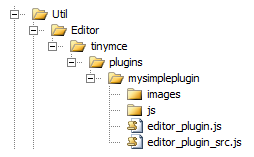
I only needed editor_plugin.js under a folder that I named typekitplugin
I created a class decorated with the TinyMCEPluginNonVisual attribute
[TinyMCEPluginNonVisual(LanguagePath = "/admin/tinymce/plugins/typekitplugin", PlugInName = "typekitplugin")]
public class TinyMCETypeKitPlugin
{
}
Once that is done you need to activate it in the editor settings
I.e. Admin - Config - Edit Custom Property Types - XhtmlString > 255 - Plugins without a button
You will find that it is missing a langauge entry which you can fix by adding TinyMCE.xml under Resources/LanguageFiles
=========================================
TinyMCE.xml
========================================
<?xml version="1.0" encoding="utf-8" ?>
<languages>
<language name="English" id="en">
<tinymce>
<typekitplugin>
<typekitplugin_desc>
Typekit Plugin
</typekitplugin_desc>
</typekitplugin>
</tinymce>
</language>
</languages>
=========================================
editor_plugin.js
You will need to change "xxxxxxx" to the ID of the TypeKit
Change the GetInfo function as appropriate
========================================
(function () {
tinymce.create('tinymce.plugins.typekitplugin', {
/**
* Initializes the plugin, this will be executed after the plugin has been created.
* This call is done before the editor instance has finished it's initialization so use the onInit event
* of the editor instance to intercept that event.
*
* @param {tinymce.Editor} ed Editor instance that the plugin is initialized in.
* @param {string} url Absolute URL to where the plugin is located.
*/
init: function (ed, url) {
ed.onPreInit.add(function (ed) {
// Get the DOM document object for the IFRAME
var doc = ed.getDoc();
// Create the script we will add to the header asynchronously
var jscript = "(function() {\n\
var config = {\n\
kitId: 'xxxxxxx'\n\
};\n\
var d = false;\n\
var tk = document.createElement('script');\n\
tk.src = '//use.typekit.net/' + config.kitId + '.js';\n\
tk.type = 'text/javascript';\n\
tk.async = 'true';\n\
tk.onload = tk.onreadystatechange = function() {\n\
var rs = this.readyState;\n\
if (d || rs && rs != 'complete' && rs != 'loaded') return;\n\
d = true;\n\
try { Typekit.load(config); } catch (e) {}\n\
};\n\
var s = document.getElementsByTagName('script')[0];\n\
s.parentNode.insertBefore(tk, s);\n\
})();";
// Create a script element and insert the TypeKit code into it
var script = doc.createElement("script");
script.type = "text/javascript";
script.appendChild(doc.createTextNode(jscript));
// Add the script to the header
doc.getElementsByTagName('head')[0].appendChild(script);
});
},
/**
* Returns information about the plugin as a name/value array.
* The current keys are longname, author, authorurl, infourl and version.
*
* @return {Object} Name/value array containing information about the plugin.
*/
getInfo: function () {
return {
longname: 'TypeKit plugin for HaurikiPHO',
author: 'Guru Digital',
authorurl: 'http://gurudigital.nz',
infourl: 'http://gurudigital.nz',
version: "1.0"
};
}
});
// Register plugin
tinymce.PluginManager.add('typekitplugin', tinymce.plugins.typekitplugin);
})();
Nice work Russel, will be definitely using this more often.