

Self deployment in DXC Service
Since the beginning of DXC Service partners and customers have always asked why they could not deploy their code by them selves. Because of our SLA on the web-application and the responsibility of customers Episerver installations, the answer was always NO, it’s not possible.
Over the years we have learned and massively improved the DXC Service to be the best service for the Episerver products. We listen to our partners and customers to improve our services and products to be the best out there.
One thing we have done is let you partners in to our PaaS portal. "Let us in to your tool you say?". Yup, you heard it right. Now it’s possible to deploy to the second step in our DXC environment (PaaS portal). What is so special with this portal? Behind the scenes we developed all the steps and checks that are necessary for a smooth and streamlined deployment process.
So you can now not only deploy to our integration environment (which you could do from the beginning) but you can now log in to the PaaS portal and make deployment to the pre-production environment with only one click (or two)  . This will make it one step easier for your deploys. Why can I still not deploy to the production? Like I mentioned in the first lines of this post this may be possible in the near future. Deploying to production is still handled as it is today through our managed service team.
In our PaaS portal it’s possible to follow the whole deployment chain from when you click the "deploy" button to the end. It’s possible to deploy, reverse, check logs, configure and more.

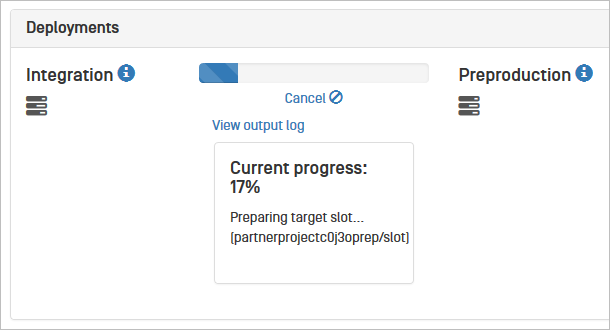
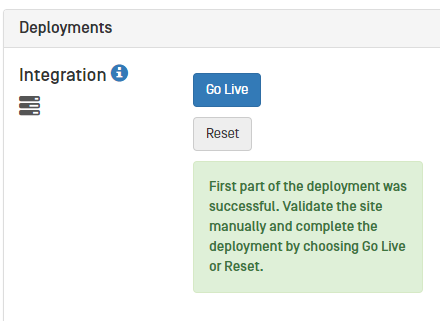
(Images from inside the portal)
So how do I get started then? This is a part of our Beta program and you must contact our support to get access to the PaaS Portal
For more step by step information read more here:
http://world.episerver.com/dxc-service-self-deployment-guide/
This tool works wonderfully! Thanks for providing it to us.
Now my greedy side shows: eagerly awaiting access to the production deployment option being released!