
Managing Multilingual Content using Episerver (Optimizely)’s Approval Sequence
Having a multilingual website is a must for any business who wants to market their products or services worldwide. However, managing multilingual content efficiently is not an easy task. Due to the complexities of online services and requirements, it becomes nearly impossible to develop custom websites from scratch and localize the source language version into multiple languages, while maintaining the integrity between the source and target languages. That’s why many businesses choose to use a content management system (CMS) to manage their dynamic content.
From a business perspective, there are three primary factors which determine the success of your digital presence. Managing multilingual content depends on:
- Content type.
- Content management system (CMS).
- Localization team.
The selection of a CMS is very important because this tool will be the mechanism where the content will be manipulated, published and updated constantly. A good CMS must have the following:
- User-friendly interface.
- Stability.
- Reliable technical support.
- Add-ons to handle additional business needs
- Localization management features, like creating multiple versions of a page, comparison between versions, workflows, etc.
Episerver (Optimizely) Multilingual Content Support
Episerver (Optimizely) is one of the best CMSs in the marketplace, so I will use Episerver (Optimizely)’s content approval sequence as an example to show how multiple users can work together as a team to manage multilingual content in their website.
For this example, let’s assume we have an Episerver (Optimizely)-based mobile website with English as the source language and a localized Arabic version. The content approval sequence can be completed in two steps:
- The product specialist approves the technical product-related content in English.
- Languages approval.
- English reviewer approves the English content.
- Arabic reviewer approves the Arabic content.
The content approval sequence is usually setup by the CMS administrator and the process is very simple:
- Admin logs in to the system with administration credentials.
- Admin selects the content and then clicks Edit Approval Sequence.
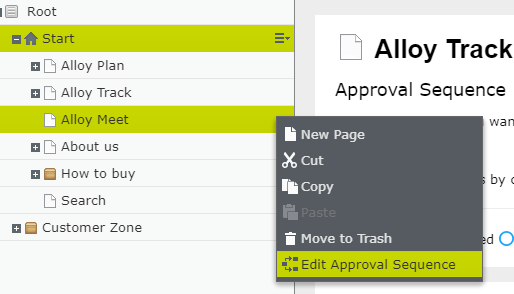
- Admin creates two approval steps:
- Product details approval.
- Languages approval.
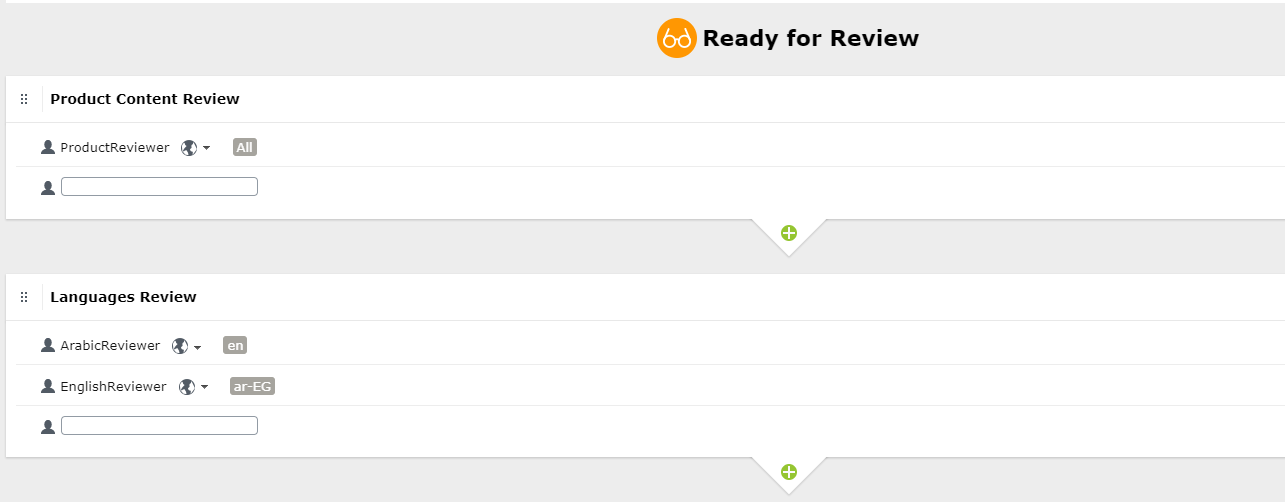
As you can see in the above screen, the first step is to approve the product details then once approved, the content will be pushed to the languages review step. The steps show how simple a group of users can handle multiple languages at the same time.
Translation Connectors
A third step for managing multilingual content is the integration of a professional localization team to localize the content. A CMS localization best practice is to use a translation connector, which is an add-on integrated with the CMS in order to automate the process of exporting and importing content without manually copying and pasting. A connector doesn’t automate the translation, it automates the process of extracting the content and then importing the translated content back into the CMS.
For example, GPI utilizes custom-built translation connectors to handle this process while providing 100% human translation. The connector has the capability of being integrated with the CMS and localization workflows, which advances the existing Episerver (Optimizely) localization features.
Comments