


Migrating from Find to Graph: Lessons Learned from a Real CMS 13 Project
While migrating a search solution from Optimizely Search & Navigation (Find) to Optimizely Graph in CMS 13, I encountered several issues that were not immediately obvious from the documentation.
Most of these issues were discovered through experimentation, debugging startup errors, investigating generated Graph schemas, and comparing behavior with Search & Navigation.
Here are details about them:
1. Graph Conventions Only Existing Starting from CMS 13.1.0
It took me quite some time to figure out how to apply Graph Conventions based on the following documentation while working on a CMS 13.0.0 project:
The documentation describes Graph Conventions using APIs such as:
services.ConfigureGraphConventions(...)ORservices.AddContentGraph(configureConventions: c => { //add conventions here });
However, I was unable to find this API in a CMS 13.0.0 implementation.
After further investigation, I discovered that the Graph Convention API was introduced in CMS 13.1.0 together with Optimizely.Graph.Cms 13.1.0 and is not available in earlier CMS 13 releases.
This initially caused some confusion because the documentation is published under the CMS 13 documentation section without clearly indicating the minimum version required for the feature.
My recommendation is to use CMS 13.1.0 or later if you plan to leverage Graph Conventions during your migration. And It would be helpful if the documentation included version-specific notes or minimum version requirements for Graph Convention APIs, as this could save developers a considerable amount of troubleshooting time during migration projects.
2. Extension Methods Work for Queries but Not for Facets
One of the first surprises I encountered was that extension methods included through Graph Conventions can be queried successfully but cannot be used for faceting.
Here is sample code:
- Configurationservices.ConfigureGraphConventions(conventions =>
{
conventions
.ForInstancesOf<StandardPage>()
.IncludeField(x => x.ContentTypeName(), IndexingType.Searchable);
});
- Extension method:
public static string ContentTypeName(this ISitePageData sitePageData)
{
    return sitePageData.GetOriginalType().Name;
}
However, when attempting to create a facet using the extension method:
query.Facet(x => x.ContentTypeName());
I saw this error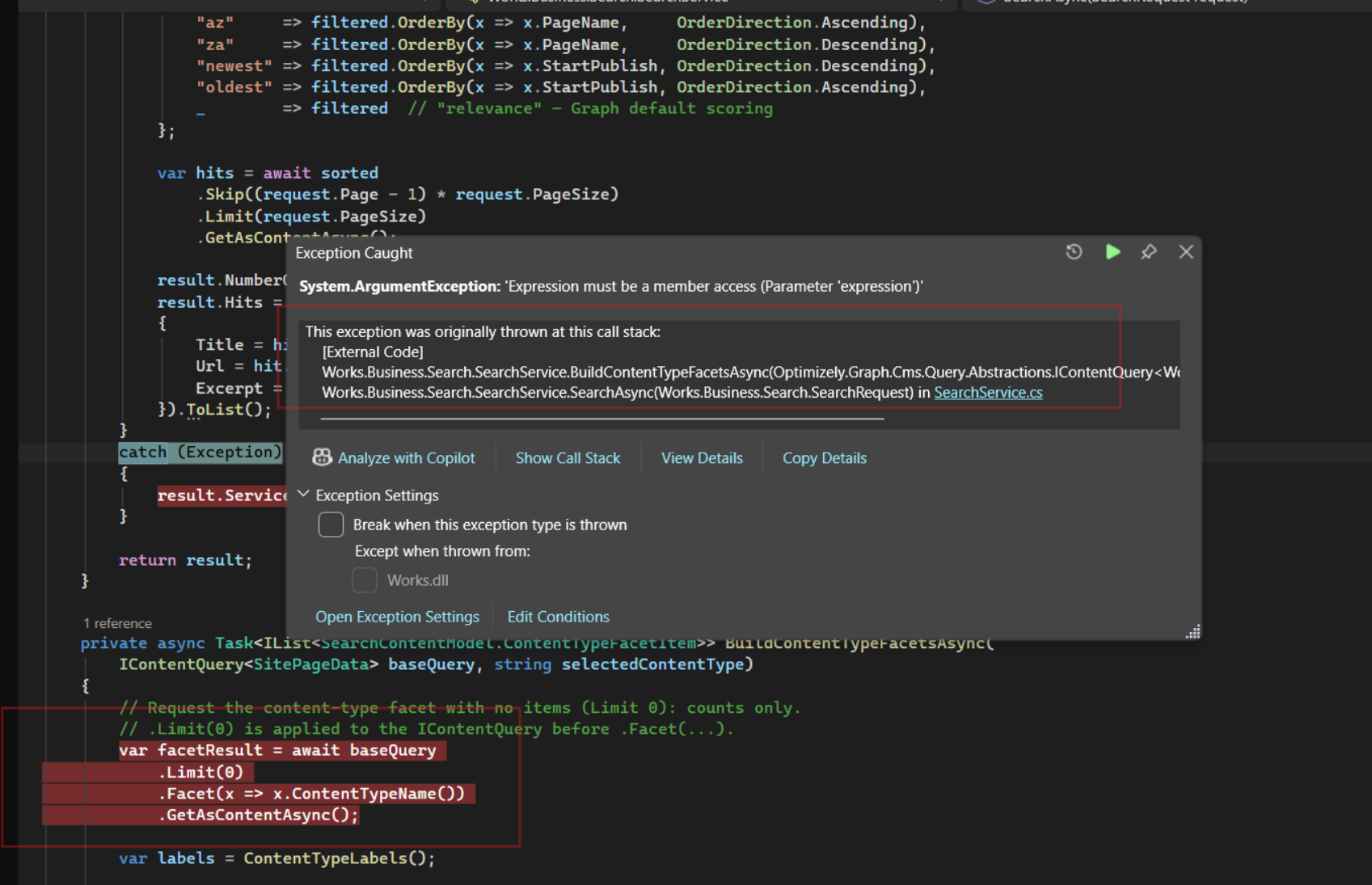
I tried running the same facet query directly in Graph Explorer, and it worked as expected. This leads me to believe that the issue may originate from the Optimizely Graph Client API when it builds the query from a lambda expression. However, I'm not sure whether this behavior is intentional or if it should be considered a bug.
Impact: Existing Find implementations that rely on calculated fields for faceting may require redesign when migrating to Graph.
3. Search By Base Type Works Differently Than Search & Navigation
In Search & Navigation, it is common to search across multiple content types by using a shared base class or marker interface.
Examples:
Search<SitePageData>()
or
Search<ISearchableContent>()
Many developers expect the same approach to work in Optimizely Graph. Unfortunately, Graph uses a different model and does not automatically support these patterns.
- What does not work
The following approaches do not create a shared Graph schema that can be queried across all implementing content types.
Simple interfaces:
public interface ISearchableContent
{
}
Abstract base classes:
public abstract class SearchablePage : PageData
{
}
Although these patterns work well in Search & Navigation, Optimizely Graph does not automatically generate a queryable Graph contract from them.
- What works
To query multiple content types through a shared schema, Optimizely Graph requires a Graph Contract.
For example:
[ContentType]public interface ISitePageData
The contract must then be implemented by each content type that should participate in the shared schema:
public class ArticlePage : ISitePageData
public class NewsPage : ISitePageData
When content is synchronized to Graph, a shared Graph type is generated for the contract, allowing queries across all implementing content types.
Content Type Management UI Behavior
One side effect of using a Graph Contract is that the interface becomes visible in the CMS Content Type Management UI.
For example, after adding the [ContentType] attribute to the interface:
[ContentType]
public interface ISitePageData
{
}
the contract appears as a content type in the CMS administration interface as following: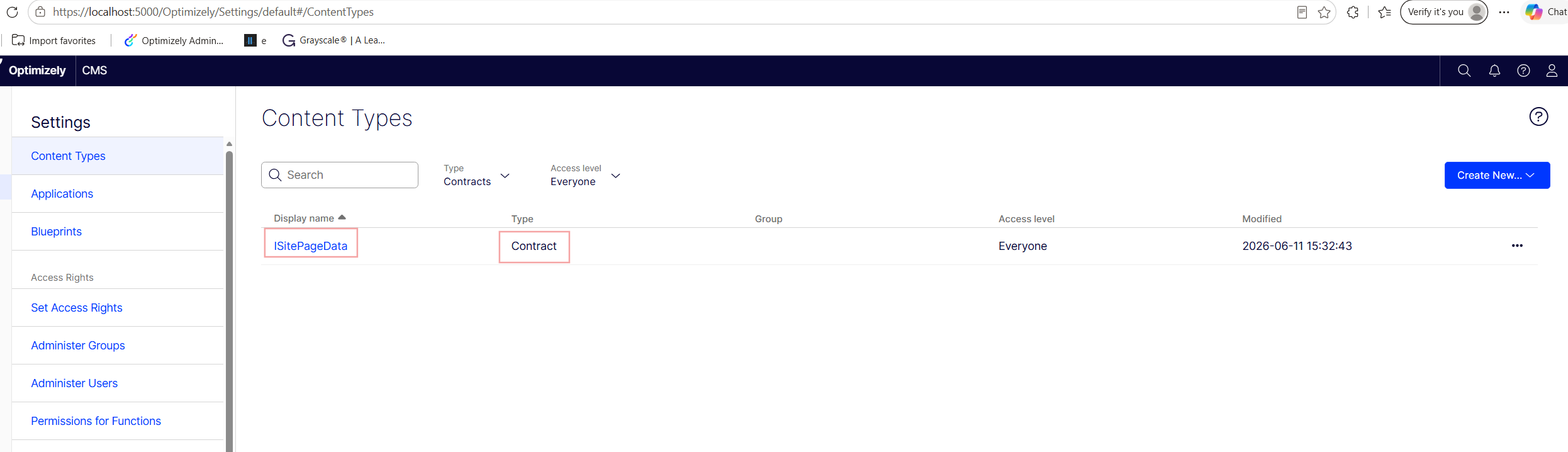
This behavior can be surprising at first, especially since the interface is not intended to be created or edited by content editors. However, this is currently the mechanism Optimizely Graph uses to discover and generate shared schema contracts.
Key takeaway: In Optimizely Graph, interfaces annotated with [ContentType] enable cross-type queries. Base class inheritance does not.
Impact: Search architectures based on inheritance hierarchies or marker interfaces must be redesigned using Graph Contracts. This can affect query models, schema design, and migration effort.
4. Using the Content Type Management UI to Change a Property's Indexing Type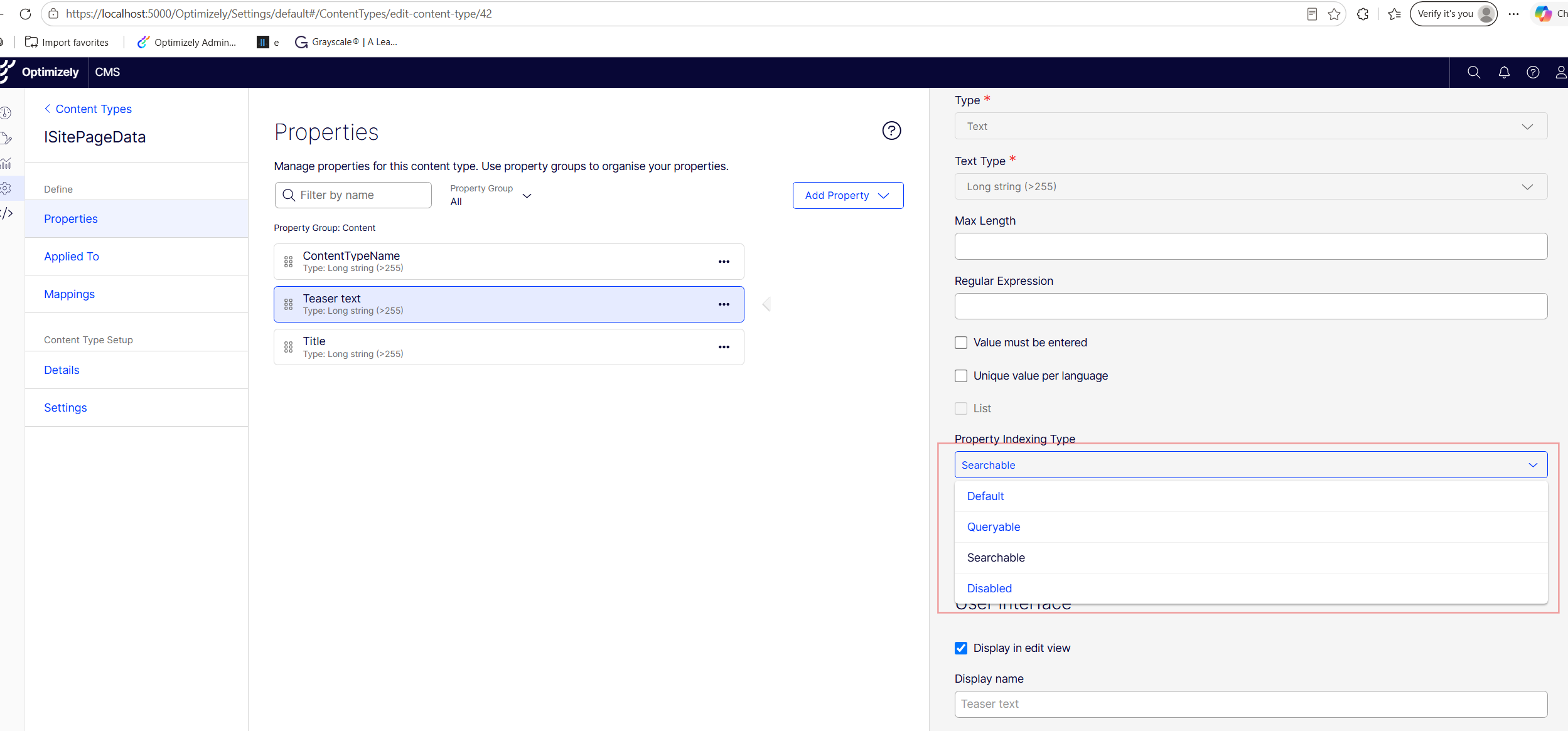
Note: The indexing convention API cannot be used to exclude a field from Graph indexing. It only supports extension methods for calculated properties, not actual content type properties.
I tried to add this below to disable an actual field:
services.AddContentGraph(configureConventions: c =>
{
    c.ForInstancesOf<StandardPage>().IncludeField(x => x.ContentAreaCssClass, IndexingType.Disabled);
});

Here is the error when I try to disable a field from indexing via convention:
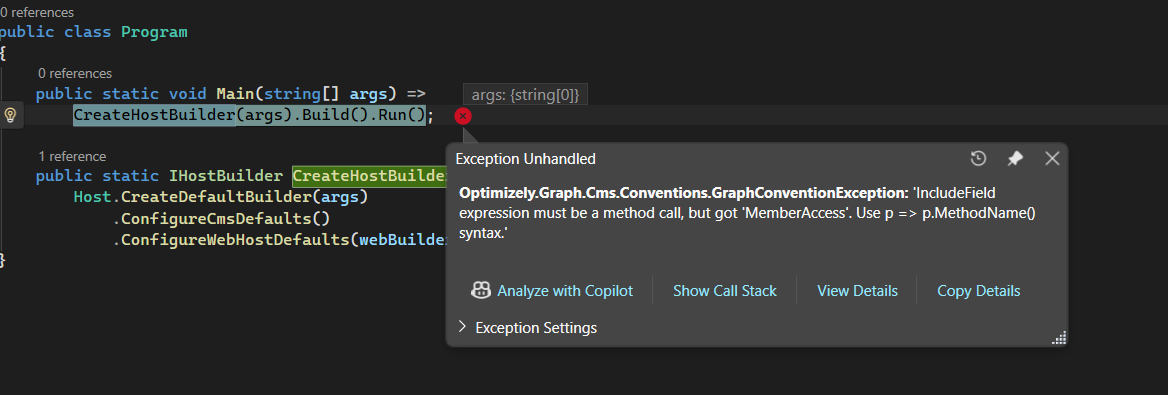
To disable indexing for a field, use the Content Type Management UI or apply the following attribute to the property in your content type:
[IndexingType(IndexingType.Disabled)]
public virtual bool HideSiteFooter { get; set; }
5. Graph Contracts and Content Types Must Use the Same IndexingType
When working with Graph Contracts, I discovered an unexpected validation rule that can prevent the application from starting.
Optimizely Graph validates property metadata across the entire contract hierarchy during startup. If the same property exists on both a Graph Contract and a content type, the IndexingType must be identical everywhere.
Example
Graph Contract:
[ContentType]
public interface ISitePageData
{
    string ContentTypeName { get; }
}
Base content type:
public abstract class SitePageData : PageData, ISitePageData
{
    [GraphProperty(IndexingType.Queryable)]
    public virtual string ContentTypeName =>
    GetOriginalType().Name;
}
Here is the error you will see if this happens: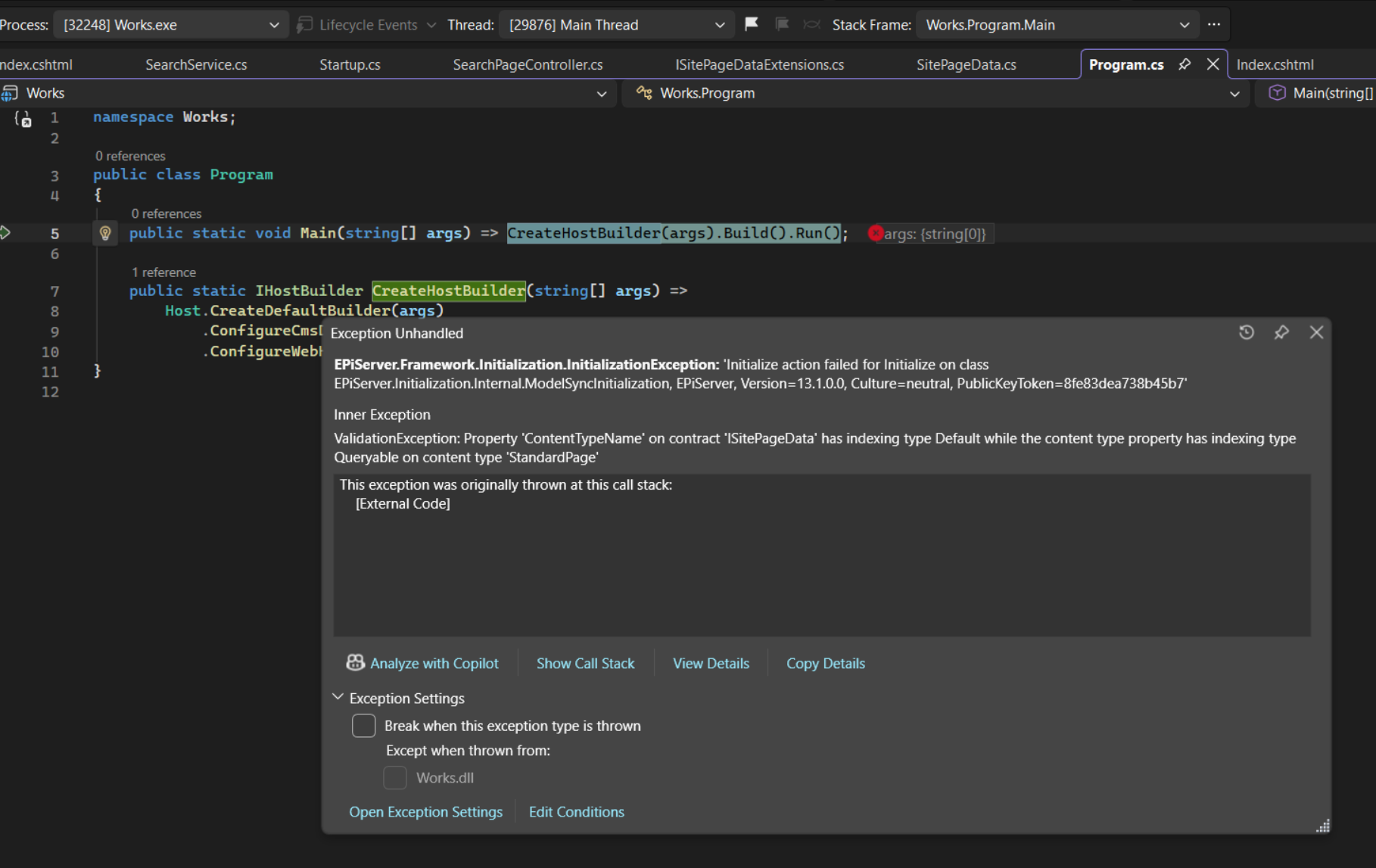
Impact: Inconsistent indexing metadata can prevent the application from starting. This validation rule becomes especially important when multiple teams maintain shared contracts and content models.
6. Getter-only/fallback properties are included in the Graph schema, but their indexed values are null
For example:
public string ContentAreaCssClass => "teaserblock";public virtual string TeaserText
{
get
{
var teaserText = this.GetPropertyValue(p => p.TeaserText);
// Use explicitly set teaser text, otherwise fall back to description
return !string.IsNullOrWhiteSpace(teaserText)
? teaserText
: MetaDescription;
}
set => this.SetPropertyValue(p => p.TeaserText, value);
}Here are the their value when indexing: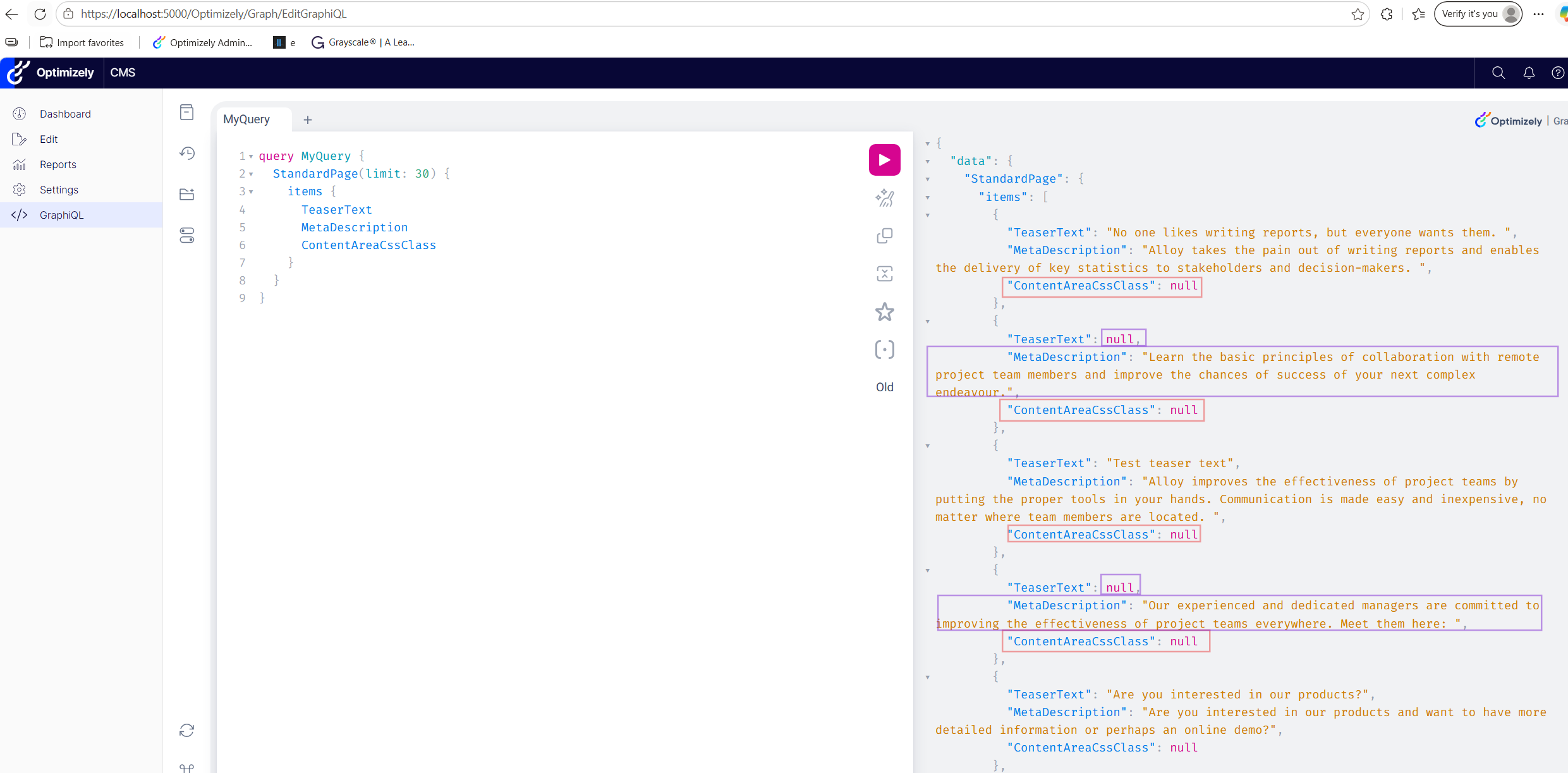
Impact: Properties that appear to work correctly in CMS may produce unexpected Graph results. Search queries, filters, and facets relying on computed values may silently return incorrect data.
7. Extension Methods Cannot Be Added to a Graph Contract as Calculated Fields
When using a Graph Contract, extension methods cannot be added as calculated fields on the contract itself.
Here is the error that I got when trying to do this: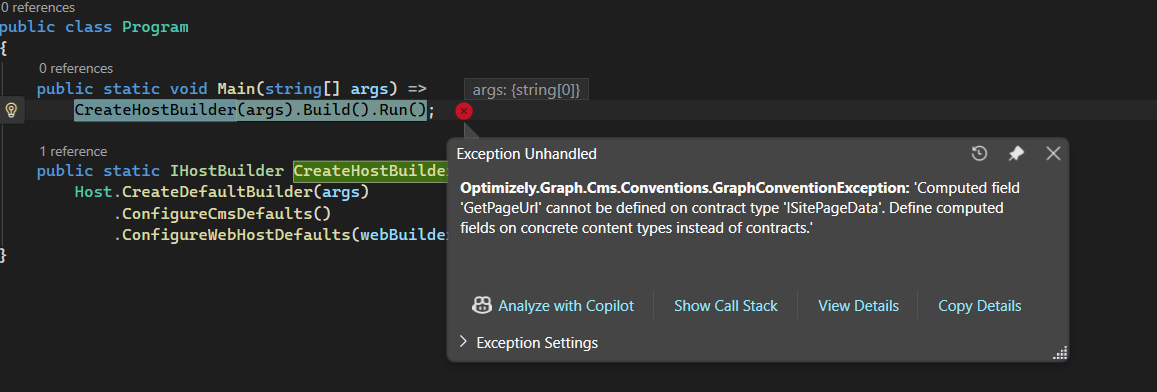
Impact: Shared Graph Contracts cannot be enriched with convention-based calculated fields. Developers may need to duplicate calculated properties across content types or redesign their schema strategy.
Conclusion
Optimizely Graph provides a powerful and flexible search platform, but it differs significantly from Search & Navigation in several areas.
When migrating existing Find implementations, pay particular attention to:
- Graph Contracts
- Graph Convention limitations
- Faceting behavior
- Property indexing rules
- Calculated fields
Understanding these differences early can save significant debugging and migration effort.
Great write-up, Binh; this lines up closely with what we've run into sizing and delivering these. The
[ContentType]Graph Contract point (3) is the one with the biggest estimation impact in my experience: any search built on a shared base class or marker interface, which is most of the Find codebases we see, has to be re-modelled, and that's a schema-design decision, not a find-and-replace.The only one I'd add to your list: computed or fallback getter properties that index as null are the quiet danger, they pass a build and only fail functionally, so a facet or filter silently returns the wrong results.
Most of these aren't mechanical migration problems, they're schema-design calls best surfaced before the build starts, and getting the Graph schema clean pays off twice, since it's the same content layer Opal reads from. Thanks for documenting them.
Thanks for sharing this knowledge!