Alex Wang
Alex Wang  -  CMS
Sep 10, 2018
visibility 5108
star star star star star
(8 votes)

Four-eyes content approval

The four-eyes principle means that a certain activity, i.e. a decision, transaction, etc., cannot be approved by the person making the change. This controlling mechanism is used to facilitate delegation of authority and increase transparency.

In previous Episerver versions, an editor who is also set as a reviewer can approve own changes. The four-eyes principle ensures that editors cannot approve their own changes. This feature was released in CMS UI 11.8.

Enabling four-eyes content approval

In the approval sequence settings, simply select the checkbox labeled "Prevent users from approving their own changes" to enable the four-eyes principle.
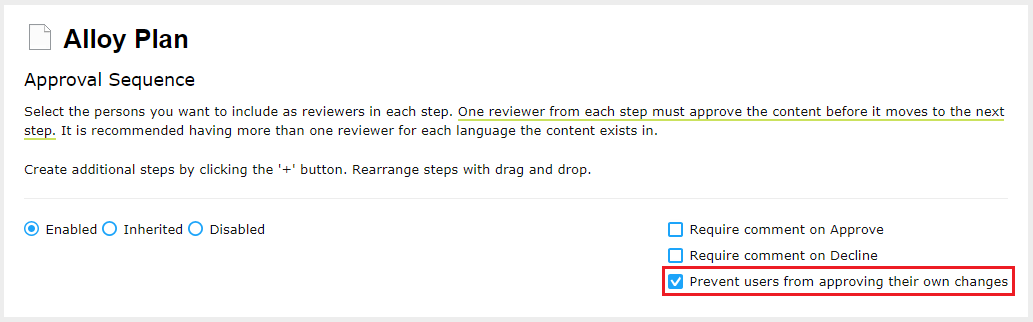
Image 4eyes.png

Sep 10, 2018

Comments

error Please login to comment.
Latest blogs
Optimizely Commerce 14 Now Supports .NET 10

In my previous post, Optimizely CMS 12 Now Fully Supports .NET 10 , I noted one remaining limitation: Commerce 14 (Commerce Connect) did not yet...

Bien Nguyen | Aug 7, 2026

The Top 10 Things I'm Actually Using AI For

A while back I wrote about ReviewPR, an Azure Function that uses AI to review Azure DevOps pull requests. That was one specific use case, but over...

KennyG | Aug 5, 2026

Drag-and-Drop Reordering for Commerce Media Collection in Optimizely Commerce Connect

Optimizely Commerce Connect ships a polished asset editor for the CommerceMediaCollection  property on catalog entries. It lets editors add, remove...

Linh Doan Cuu | Aug 5, 2026

Order tabs with drag and drop V2

I earlier did a very simple Blazor version to be able to sort tabs with drag and drop. I wanted to update it a bit and also display how the tabs ar...

Per Nergård (MVP) | Aug 4, 2026