


Fixing index_not_found_exception After Purging External Data in Optimizely Graph
The Scenario: Indexing External Data
When working with Optimizely Content Graph, indexing external data is a straightforward process. Synchronize custom data sources with Optimizely Graph
Followed by setting up a GraphQL schema to push an external content type called Article into a specific source src1
Here is the initial schema definition using the V3 API:
curl --location --request PUT 'https://cg.optimizely.com/api/content/v3/types?id=src1' \
--header 'Content-Type: application/json' \
--header 'Authorization: Basic BASE64_ENCODED_CREDENTIALS' \
--data '{
  "languages": ["en-US"],
  "contentTypes":{
   "Article": {
     "contentType": [],
     "properties": {
       "Id": { "type": "Int" },
       "Keywords": { "type": "String", "searchable": true },
       "Language": { "type": "String" },
       "Comment": { "type": "String" },
       "Body": { "type": "String", "searchable": true },
       "Summary": { "type": "String", "searchable": true },
       "CreatedTime": { "type": "Date" }
     }
   }
 }
}'
After registering the schema, I successfully synced the content using Post request via a scheduled job. The data was indexed and queryable.POST /api/content/v2/data?id=src1
The Problem: A Silent Failure Post-Purge
To clean up the index and start fresh, I executed a purge operation using the API: DELETE /api/content/v2/data?id=src1
While the purge succeeded and cleared the results, a major issue occurred when my scheduled job tried to sync new data. The Post request returned a successful response with a journalId, but queries still returned zero items.
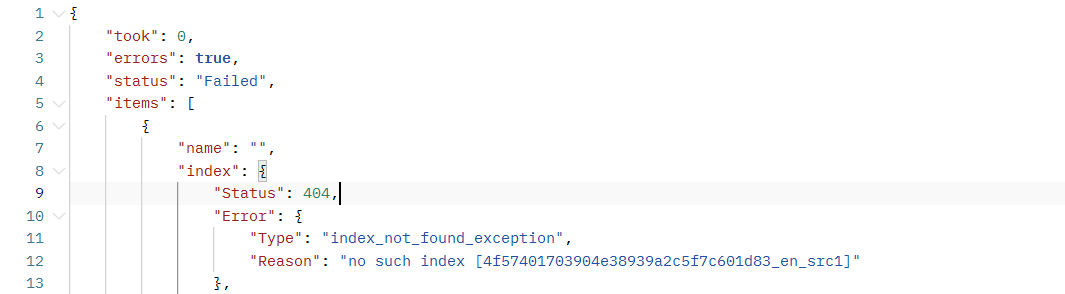
Upon checking the journal stream details in Postman I found the culprit: a failed status throwing an index_not_found_exception https://cg.optimizely.com/journal/stream/journalId
The Root Cause: Management Layer vs. Storage Layer
Why did the API return a success response if the index didn't exist? The answer lies in how Optimizely Content Graph separates data configuration:
-
The Management Layer (Schema Registry): When you check for your schema, the API looks at its registry. The blueprint for Article is still there, so the ingestion gateway assumes everything is fine and accepts your data stream (giving you a success response and a journalId).
-
The Storage Layer (Elasticsearch Cluster): This is where the physical data buckets live. When you performed the purge, it completely wiped the physical storage bucket to free up cloud resources.
When the background worker attempts to write your new data to the physical storage layer, it panics and throws the index_not_found_exception because the actual bucket no longer exists.
According to the Optimizely development team, the legacy DELETE /api/content/v2/data and the newer DELETE /api/content/v3/sources?mode=data endpoints delete all data, including the underlying indices. Because this is an external content type, the system doesn't automatically rebuild the physical container upon receiving new data.
The Current Solution
If you expect a purge to solely remove records while keeping the underlying physical container intact, you will run into this error. As the purge inherently drops the Elasticsearch index, you must manually recreate it.
To resolve this, you must re-push your schema before indexing new documents.
-
Purge the data:
DELETE /api/content/v2/data?id=src1 -
Recreate the Schema: Resend your original PUT request to o rebuild the physical storage index.
PUT /api/content/v3/types?id=src1 -
Sync the Content: Execute your Post request to index the new documents.
By pushing the schema again after every purge, you ensure the underlying Elasticsearch container is recreated and ready to accept your external content data streams.
Support the Feature Request
While the workaround above successfully resolves the issue, the ideal behavior would be for the purge operation to delete only the content records, leaving the underlying physical container and schema intact so background syncs don't fail.
I have submitted a feedback request to the Optimizely support to address this behavior. If you have run into this same issue, please upvote and support the request here:
Vote here: Sync External Content Data - Purge Deletes Content and Schema
Comments