
Common properties amongst the pages
For example:
PropertyCriteriaCollection
propertyCriteriaCollection = new PropertyCriteriaCollection();
PropertyCriteria criteria = new PropertyCriteria();
criteria.Condition = CompareCondition.Equal;
criteria.Name = "PageTypeID";
criteria.Type = PropertyDataType.PageType;
criteria.Value = PageType.Load("SettingsPage").ID.ToString();
criteria.Required = true;
propertyCriteriaCollection.Add(criteria);
PageDataCollection pageDataCollection
= DataFactory.Instance.FindPagesWithCriteria
(PageReference.RootPage, propertyCriteriaCollection);
if (pageDataCollection == null || pageDataCollection.Count == 0)
return;
if (pageDataCollection[0]["SomeProperty"] != null)
TextBox1.Text =
pageDataCollection[0] ["SomeProperty"].ToString();
You see how many actions should be performed with a single aim – to get the SettingsPage’s SomeProperty value. Evidently it’s tiresome and error prone.
Instead you can force the page to load properties values from some other page. For this just open the Shortcut/External Link tab in edit mode, assign “Fetch data from page in EPiServer CMS” to Link type , and choose the page the properties are loaded from (f.e. SettingsPage):
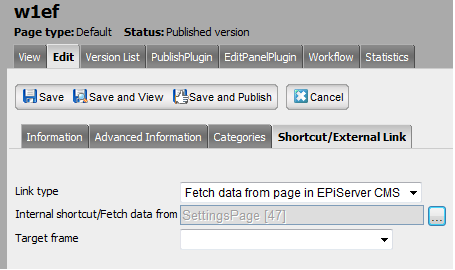
From this time you can apply to SettingsPage as if they belonged to the w1ef page:
string someProperty = CurrentPage["SomeProperty"] as string;
or:
<EPiServer:Property PropertyName="SomeProperty" runat="server" />
What if you need both settings and data from another page? I like the PluginProperty approach:
[PlugInProperty(
Description = "PageTypeID: Start Page",
AdminControl = typeof(InputPageType),
AdminControlValue = "PageTypeID")]
public int StartPageTypeID { get; set; }
... and a singelton class to retrieve them.
Sure, it's suitable if you want to get data from one page (not more)
Sure, it's suitable if you want to get data from one page (not more)