

EPiServer Connect for SharePoint 2.4 and Virtual Path Provider file check out
The new version of EPiServer Connect for Microsoft SharePoint offers a lot of fixes, mostly related to overcome changes in MOSS 2010 in comparison with MOSS 2007 and to increase overall stability of the module. Also the new version has an improvement for the file check out operation in Virtual Path Provider for SharePoint (VPP SP).
VPP SP can be configured in two security modes: “single user” - when a special SharePoint account is used, and delegation - when CMS users connect to SharePoint with their own credentials.
Single user mode configuration sample:
1: <add name="SharePointFiles" showInFileManager="true" bypassAccessCheck="false"
2: virtualPath="~/SharePoint/" isMOSS="False" wssSiteUrl="http://vm-sp"
3: wssDomainName="" wssLogin="Administrator" wssPassword="p@ss1word" useImpersonation="false"
4: virtualName="SharePoint" customFileSummary="~/WSSFileSummary.config"
5: useCache="True" cacheExpirationTime="30"
6: type="EPiServer.VirtualPathWssProvider.VirtualPathWssProvider,EPiServer.VirtualPathWssProvider"
7: wssRootFolder="Shared Documents" />
If VPP SP is configured in a “single user” authentication mode all users actions in EPiServer CMS file manager are executed on the SharePoint side on behalf of the user specified in VPP SP configuration (see line 3 in the sample). The main advantage of the “single user” mode is that it is much easier to configure. In most cases it works fine, except Check Out and Check In operations. In the previous version a file, checked out by any user in CMS file manager, is displayed as checked out by the user specified in VPP SP configuration:

In the new version we implemented a better support of this operations. When user performs Check Out operation on a file in VPP SP the special record is made in EPiServer CMS database (using Dynamic Data Store). Information from this record is used to display proper value of the “Checked Out By” field and enables Check In or Cancel Check Out operations only for the user who actually checked out the file or administrators.
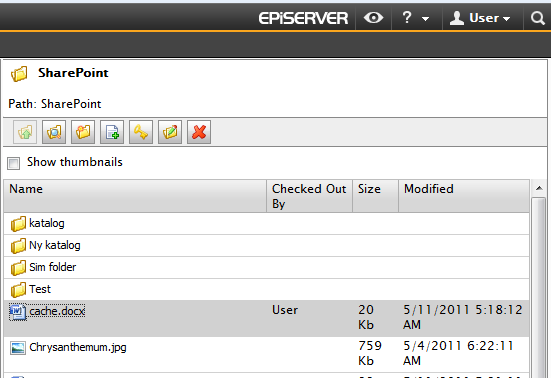
This workaround makes operations with file versions in VPP SP more convenient. However, on the SharePoint side everything looks the same as before since the files in fact, checked out in SharePoint by the user specified in VPP SP configuration. If that solution does not fit your needs you can use delegation – in that case all file operations are executed as if the user is on SharePoint site.
Comments