Per Nergård (MVP)
+1
Jun 7, 2016
visibility 3144
star star star star star
(1 votes)

Overview of content type syncronization status

Ok time for another overview plugin. This time it's a plugin that gives you an overview of wich content types (both pages and blocks) wich are not fully synchronized due to one or many changes done via admin mode.

It's very simple, just an html table with some information about the type and the possiblity to tick a checkbox if you wan't to reset it. There are three buttons wich is self explanatory. On a reset the appdomain is unloaded and a redirect to the plugin is done.  I guess that the save and reset only buttons are unnecessary but I was to lazy to remove them.

The background story for this plugin is that a collegaue of mine made changes to some models and the didn't get persisted. It was a bit odd since as far as I new no one had done any admin mode changes to this type. So I just tried to reset the offending type and voila the code changes took effect. 

As usual you can get the code over at my gist.
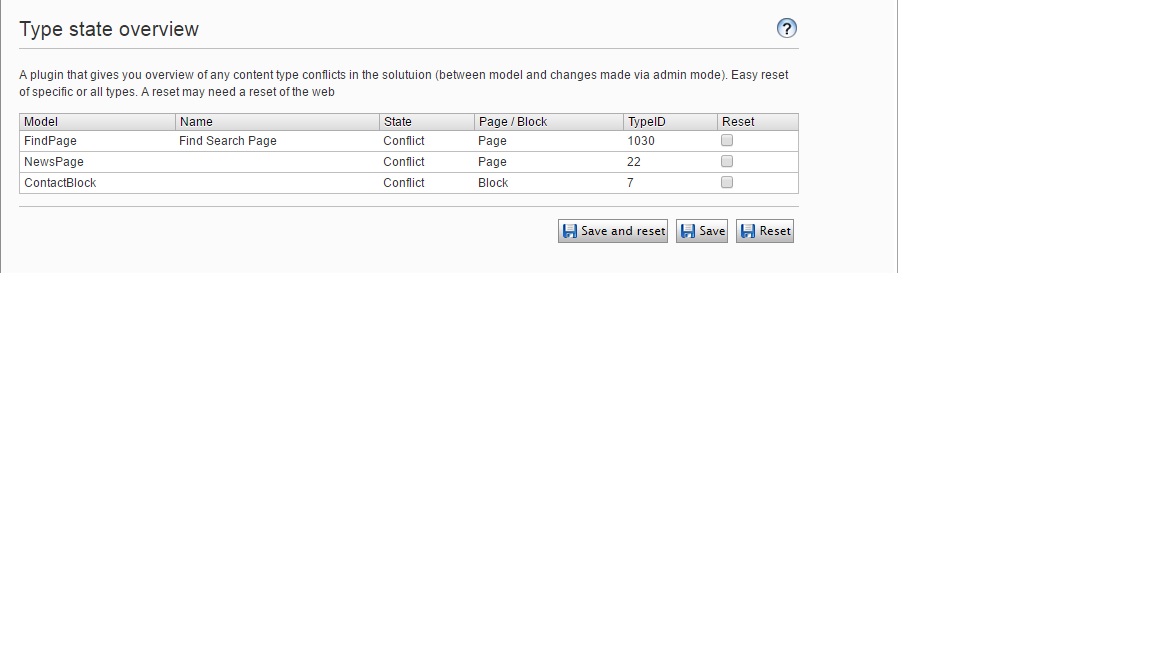
Image resetter1.jpg

Jun 07, 2016

Comments

per
per Jun 17, 2016 12:51 PM

Cool, there is a similar view in this GutHub project but it is missing the buttons which was a nice touch.

https://github.com/episerver/DeveloperTools

per
per Jun 17, 2016 12:51 PM

GutHub is a nice one :-)

error Please login to comment.
Latest blogs
Optimizely Commerce 14 Now Supports .NET 10

In my previous post, Optimizely CMS 12 Now Fully Supports .NET 10 , I noted one remaining limitation: Commerce 14 (Commerce Connect) did not yet...

Bien Nguyen | Aug 7, 2026

The Top 10 Things I'm Actually Using AI For

A while back I wrote about ReviewPR, an Azure Function that uses AI to review Azure DevOps pull requests. That was one specific use case, but over...

KennyG | Aug 5, 2026

Drag-and-Drop Reordering for Commerce Media Collection in Optimizely Commerce Connect

Optimizely Commerce Connect ships a polished asset editor for the CommerceMediaCollection  property on catalog entries. It lets editors add, remove...

Linh Doan Cuu | Aug 5, 2026

Order tabs with drag and drop V2

I earlier did a very simple Blazor version to be able to sort tabs with drag and drop. I wanted to update it a bit and also display how the tabs ar...

Per Nergård (MVP) | Aug 4, 2026