


Overview of properties and AllowedTypes attribute
When testing a website one important piece for me is to validate that all content areas have the correct allowed types. Since I'm a developer I have compared the code to the specification. But reading this blog post about getting a list of allowed page types for a specific page type (post here) inspired me to make a small tool for that.
In the process I added the allowed page types code and a silly feature that just prints the count of pages per page type (from the root page, and with FPW call).
It looks like this:
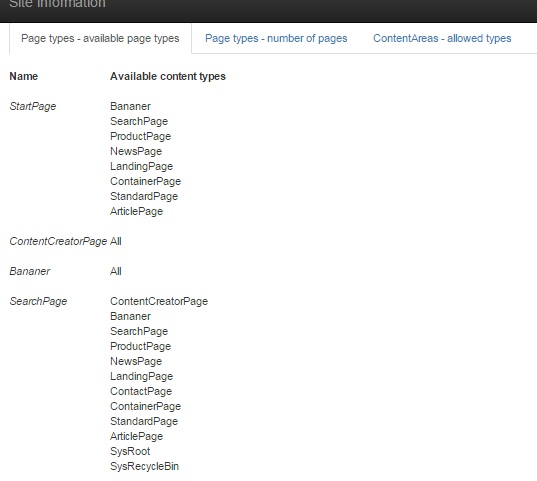
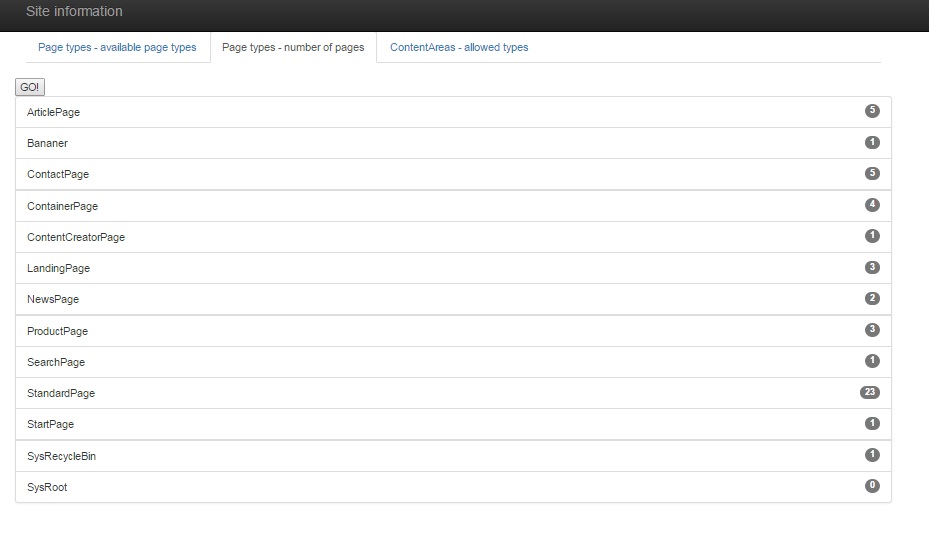
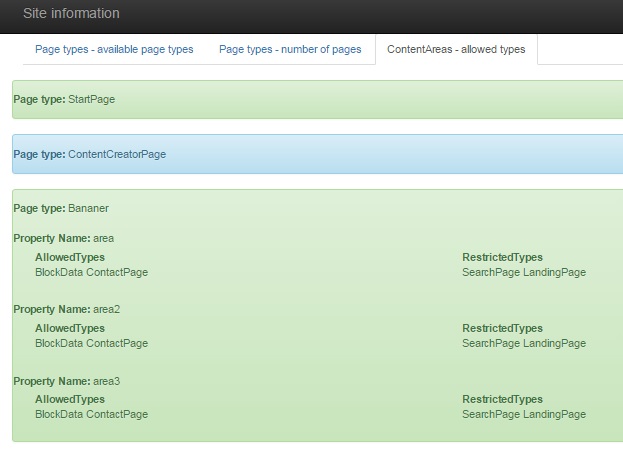
Code over at GitHub. I use CodeFile instead of CodeBehind so if you wan't to add it to your solution be sure to change it. If you just wan't to test it out just drop it in the root folder.
Sep 23, 2015
Nice, simple and powerful!
Haven't checked the code- but would be nice to see a list of all page instances and links to it for "Page types - number of pages". Have you considered to "alter" built-in content type editor pages and provide this functionality also there? :) This can be done via Asp.Net web page adapters.
Hi Valids
Would be easy enough to add links to the pages since I do a simple FPWC call to get the count so I already have the list.
Haven't considered changing the built in content type editor pages but it's a good idea.