Per Nergård (MVP)
+1
Sep 24, 2010
visibility 6140
star star star star star
(1 votes)

Quick document select property

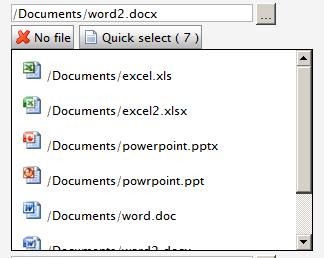
A custom property for selecting documents. Built on the same base as my “quick image select property”.

I’ve added two buttons to the original property. The first one for removing the selected document and the second displays a vertical scrolling layer displaying a list of all documents in the current selected document folder and below. The number in parentheses is the number of documents found.

Clicking on a image changes the selected image url. The title for each image displays the virtual path.

Not done yet: I’ve not added language handling of the button texts, the quick select button opens up an empty container even if no documents were found.


 

Quickselectorgeneral

quickdocumentsselect

quickdocumentquickselect

You can find the code over at the codesection.

Sep 24, 2010

Comments

Anders Hattestad
Anders Hattestad Sep 24, 2010 09:07 AM

Have to say I like the consept.

error Please login to comment.
Latest blogs
Stott Security for Optimizely SaaS CMS

Introduction Stott Security  has been helping developers and editors manage Content Security Policies and security headers on  Optimizely PaaS CMS...

Mark Stott | Aug 13, 2026

Optimizely XML Resource Builder: A Visual Studio Extension for Language Resource Files

Anyone who has worked on a larger Optimizely solution will know the feeling. You add or update a page type, block type, or shared base class,

Adnan Zameer | Aug 13, 2026 |

Optimizely SaaS CMS Management API: The Write Side of Headless

Everything I’ve written in this series so far has been about reading content — Optimizely Graph, webhooks, ISR, caching layers. But at some point y...

Kiran Patil | Aug 12, 2026 |

Assistants, Instructions and Statistics

We are introducing three new features for AI Assistant in Optimizely CMS. They make it easier to reuse AI expertise, work faster and understand how...

Luc Gosso (MVP) | Aug 11, 2026 |