smithsson68@gmail.com
Aug 18, 2011
visibility 6452
star star star star star
(3 votes)

Visitor Group Usage Report

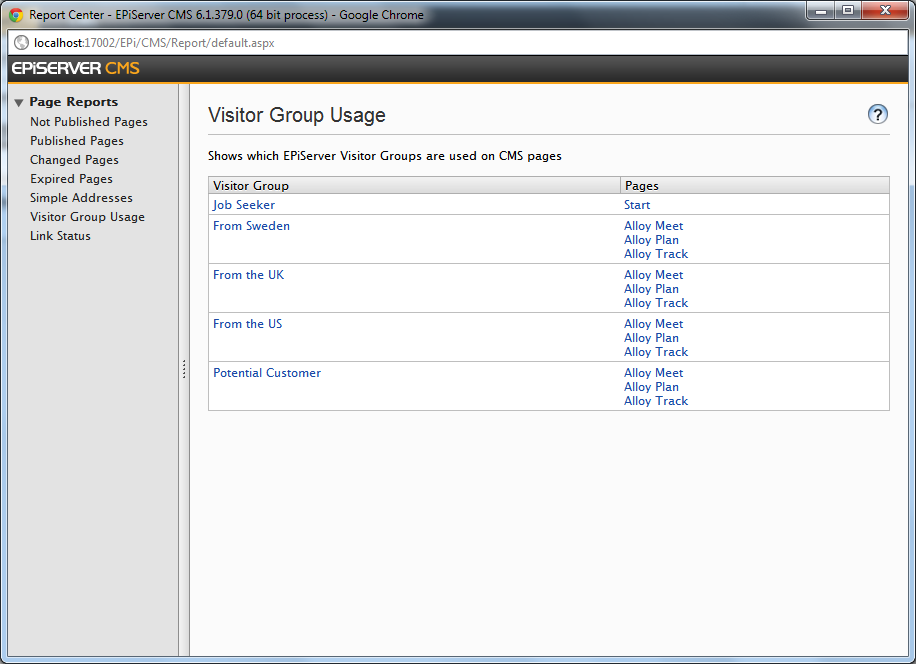
I have created a simple report to show which CMS pages EPiServer Visitor Groups are used on:
image

Clicking the Visitor Group name will take you to VG Admin for the Visitor Group. Clicking the page name will take you to CMS Edit Mode for that page.

The source code is available in the EPiServer.Samples.VisitorGroupUsageReport package on EPiServer Nuget.

Feel free to use as is, amend, rip apart etc. Feedback, as always, is welcome.

Happy reporting!

Aug 18, 2011

Comments

Aug 18, 2011 10:02 PM

Nice one Paul!

If I could add a feature it would be that the pages column only listed the first 5 pages, and then you had to click to see the rest.

Now the question is who is going to add it...

smithsson68@gmail.com
smithsson68@gmail.com Aug 18, 2011 10:13 PM

Sound like some slippery HTML / CSS trick which I suck at!!

Aug 18, 2011 10:57 PM

Well now's as good time as any to learn ;)

Aug 19, 2011 12:44 AM

Awesome stuff Paul.

This is something I've been thinking about recently.

One of the issues personalised content brings is how editors understand and manage that content. I'd always thought that having an icon in the page tree to mark if a page has personalised content would be a useful additional feature.

smithsson68@gmail.com
smithsson68@gmail.com Aug 19, 2011 12:49 AM

Hi Mark,

The Icon thing was done by Per Nergård although I haven't tried it:

http://world.episerver.com/Code/Per-Nergard/Icon-in-PageTree-for-pages-with-visitor-group-content/

/Paul.

Aug 19, 2011 01:31 PM

I like it!

Jeff Wallace
Jeff Wallace Aug 20, 2011 01:08 AM

Nice.

error Please login to comment.
Latest blogs
Finding Thomas Part 3 - The Moment of Recognition

Remember Thomas? In digital landscape, Thomas is the returning visitor who reads everything, opens every email, converts on nothing. In standard...

Ritu Madan | Jun 26, 2026

Add more scheduled job settings from the Optimizely CMS 12 admin UI -- with OptiScheduledJob.ExtraParameters

  Optimizely (EPiServer) CMS 12 ships a great scheduled-jobs framework, but it has one frustrating gap: a job has nowhere to store its own...

Binh Nguyen Thi | Jun 25, 2026

Automated Search & Navigation to Graph Migration with Claude Code

A Claude Code plugin that scans your S&N codebase, applies Graph SDK transformations, and validates the result. Install once, run one command. CMS ...

Connor Fortin | Jun 24, 2026

Migrating from Find to Graph: Lessons Learned from a Real CMS 13 Project

While migrating a search solution from Optimizely Search & Navigation (Find) to Optimizely Graph in CMS 13, I encountered several issues that were...

Binh Nguyen Thi | Jun 24, 2026

Optimizely: Upgrade Opti-ID and .NET 10 in CMS 12

Many Optimizely customers are planning their roadmap around a future migration to Optimizely CMS 13. As a result, upgrades such as Opti ID adoption...

Madhu | Jun 23, 2026 |

Understanding Optimizely Graph: Caching, Webhooks & Avoiding Stale Content (Optimizely SaaS CMS)

📌 Scope: This post covers Optimizely CMS (SaaS) only — using the official @optimizely/cms-sdk and @optimizely/cms-cli packages with Next.js 15. If...

Kiran Patil | Jun 23, 2026 |