
Time Period Visitor Group Criterion
I saw a requirement from a customer who wanted to be able to set start and stop publish dates for different parts of a page.
This of course can be done by creating and maintaining several page versions but sounds like quite a clumsy solution to me.
With that said, please say hello to TimePeriodCriterion. This works by having a start date and time and an end date and time. The criterion only matches when the current date and time are within the time range specified.
namespace CriteriaPack.TimePeriodCriterion
{
    [VisitorGroupCriterion(
      DisplayName = "Time Period",
      Category = "Time and Place Criteria",
      LanguagePath = "/shell/cms/visitorgroups/criteria/timeperiod")]
    public class TimePeriodCriterion : CriterionBase<TimePeriodCriterionModel>
    {
        public override bool IsMatch(System.Security.Principal.IPrincipal principal, HttpContextBase httpContext)
        {
            return DateTime.Now >= this.RangeStart && DateTime.Now <= RangeEnd;
        }

        protected DateTime RangeStart
        {
            get
            {
                return Model.StartDate.Add(Model.StartTime.TimeOfDay);
            }
        }

        protected DateTime RangeEnd
        {
            get
            {
                return Model.EndDate.Add(Model.EndTime.TimeOfDay);
            }
        }
    }

    public class TimePeriodCriterionModel : CriterionModelBase
    {
        [DojoWidget(WidgetType="dijit.form.DateTextBox")]
        [Required]
        public DateTime StartDate { get; set; }

        [DojoWidget(WidgetType = "dijit.form.TimeTextBox")]
        [Required]
        public DateTime StartTime { get; set; }

        [DojoWidget(WidgetType = "dijit.form.DateTextBox")]
        [Required]
        public DateTime EndDate { get; set; }

        [DojoWidget(WidgetType = "dijit.form.TimeTextBox")]
        [Required]
        public DateTime EndTime { get; set; }

        public override ICriterionModel Copy()
        {
            // We can use the ShallowCopy method as this class
            // does not have any members that need to be deep copied
            return base.ShallowCopy();
        }
    }
}
A couple of the advantages of implementing start/stop publish as a criterion are that it can of course be combined with other criteria in a Visitor Group and you can also specify fallback content, i.e. something else to display on the page when the end time and date has been passed.
For example, competition information on a start page:
Create an EPiServer Visitor Group with the Time Period criterion specifying the dates the July competition is open for entry:
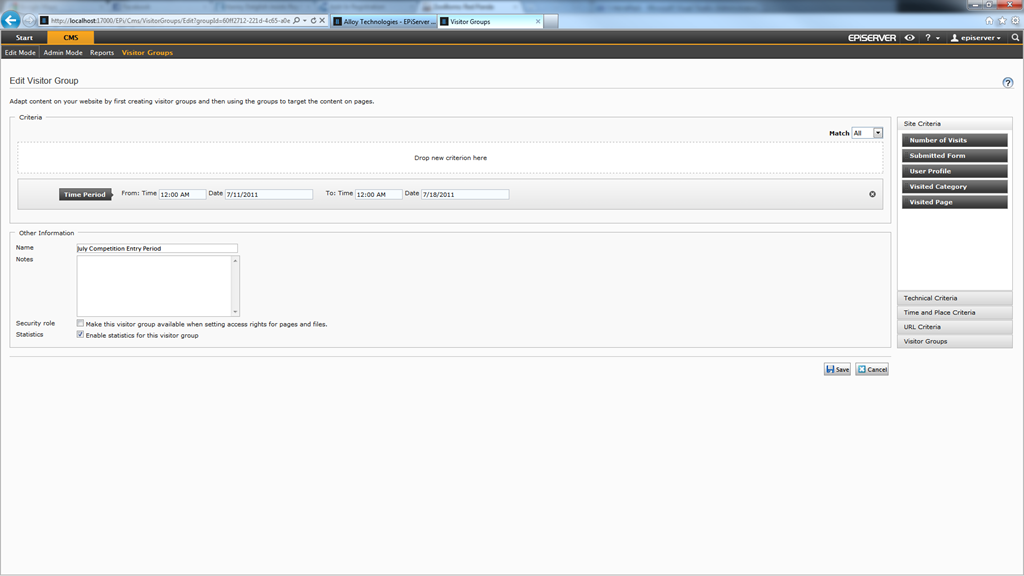
Information can now be added about the competition to the start page in a personalized content block selecting the ‘July Competition Entry Period’ Visitor Group created with the Time Period criterion.
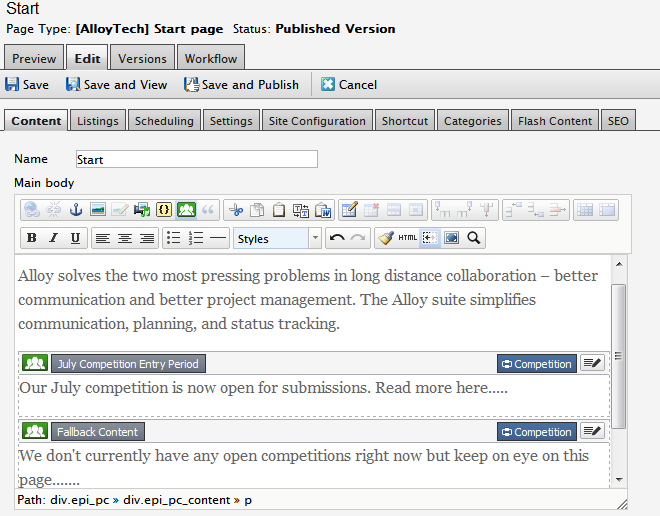
The information about entering the competition will now only be shown between the dates specified in the criterion, otherwise the fallback content will be specified.
A NuGet package called TimePeriodCriterion containing just the re-distributable components (as with all CriterionPack NuGet packages) can be downloaded from nuget.episerver.com, alternatively you can get the source code from CodePlex.
A simple yet useful criteria. Nice work!