
EPiServer Youtube Gadget
Hello, my name is Patrick and I'm currently studying at Academedia in Sweden/Liljeholmen to become a developer in .Net. This will be my first ever blogpost about something I have developed.
I have developed a youtube EPiServer Gadget while doing my practice at Logica.
It's a EPiServer gadget that is connected through settings in a sites config to a youtube account. With this gadget the users of an EPi Site gets their own private youtube there the users with the chosen admin role can administer the youtube account that the gadget is connected to without ever leaving the dashboard and without ever logging in to youtube.com, AMAZING? I think so :)
So lets take a look at this beauty

Ok.. Not too fancy but it serves it's purpose :)
Lets take a look at one of the menu options, the "playlist"
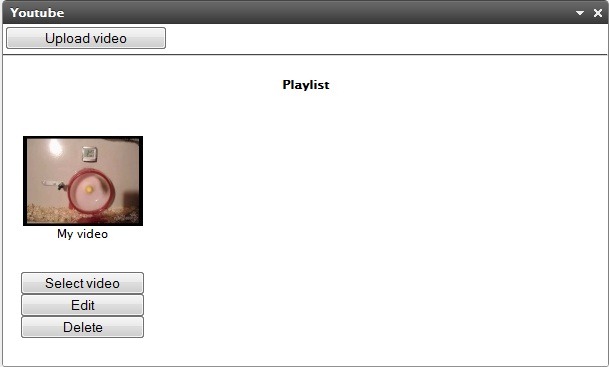
As I'm here in the admin role that is allowed to administer the youtube account I can from here upload, delete and edit videos, while users that arent in that user role can only select videos from here to watch.
Let's take a look at the other menu option, called "settings".

Here the user can select the size for the videoplayer in the dashboard.
Lets take a look now at how we can get this gadget up and working at any EPi site.
1. Download the gadget, from here: www.paib.se/YoutubeGadget/YoutubeGadget.zip
2. Add a reference to the dll files in the folder "bin" to your EPi site
3. Add the xml file from the folder "lang" to your EPi sites folder lang
4. Add the folder "VideoGadget" to the start folder of your EPi site
5. Add the following in your sites config under the tag <system.webServer>
<add name="VideoGadgetMVCRouting" type="VideoGadget.GadgetViewEngineModule, VideoGadget" />
6. Add the following in your sites config under the tag <publicModules>
<add name="VideoGadget">
<assemblies>
<add assembly="VideoGadget"/>
</assemblies>
</add>
7. Register a youtube account + youtube developer account
8. Login to your developer account and create a "new product"
9. Add the following in your sites config under the tag </episerver.shell> with the right information
<appSettings>
<add key="youtubeUsername" value="Insert youtube username" />
<add key="youtubePassword" value="Insert youtube password" />
<add key="adminRole" value="Administrators" />
<add key="defaultYoutubeVideo" value="If you want insert an url to a youtube user or video, will be shown when theres no videos in the account, otherwise just leave this field blank" />
<add key="videoGadgetUrl" value="insert your EPi sites url here + /VideoGadget/"/>
<add key="youtubeApplicationName" value="Insert your application name from step 8" />
<add key="youtubeDeveloperKey" value="Insert your developer key from step 8" />
</appSettings>
And heres the source code: http://www.paib.se/YoutubeGadget/YoutubeGadgetSourceCode.zip
Welcome to EPiServer World!
That's a really nice gadget btw :)
Thanks Tobias :)