
Similarity between EPiServer CMS and WSS - II
I am starting from where I left in my previous blog (http://world.episerver.com/Blogs/Manoj-Kumar/Dates/2012/4/Similarity-between-EPiServer-CMS-and-WSS/).
I have created application in WSS like Training Management(http://msdn.microsoft.com/en-us/library/ff649870.aspx). The question was, Can I create an application like that in EPi Server CMS? Well at first look it is no. WSS is made to support many types of content where as EPi Server cms is made for supporting only web content.
But before giving up I thought to give it a try. So to start on I took the basic component used by WSS to create these application and compare it with similar features present in EPi Server CMS.
Features used in wss are - Workflow, Web parts, List, Document library, Task list, Content type, users/roles and Event Receivers.
First WSS has its own workflow architecture so does EPi Server.
WSS has web parts EPi Server can implement web parts.
Content type and list are the core of wss applications. document library is a special kind of list that deals with documents. task list is also inherit features from normal list. So the main component are content type and list of WSS. In simplest form if we define the WSS list it is a mini table and in EPi Server the closest thing that we can use like that is a page tree. it’s very normal to use epi server pages as mini table in many EPi Server sites.
The equivalent of content type will be page types( or page type builder which bring features like strong property types, inheritance of page types etc..) that are used to build the above mentioned page trees.
Finally the event receivers the closest thing that I was able to find for event receivers is EPi Server workflow activates.
Next thing is the UI of WSS and how to make EPI server UI support list/document UI(edit form, view form etc.) This UI of wss act as a base of application like Training Management.
lets look at wss menu to view the different kind of list and document library. On click of these menu items the list and document library data is shown which you can view, add, edit and delete.
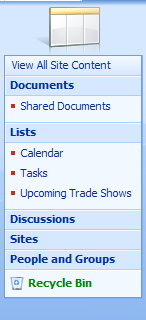
Figure 1
The only equivalent of above wss UI is the edit mode of EPi Server. Similar to the above menu(Figure 1) is the page tree structure of EPi Server. for add edit and delete operation we can use normal page property operations in edit mode. Now the view part has to be done especially in EPi server page made from scratch(Figure 2). We know that in WSS there are many views available beside the tabular view. For example the document library have an explorer view.

Figure 2
This gives me a framework that can act as base to create application like wss -Training Management.
Comments