
EPIServer XForm Data Retrieving
XForms contains logic to store and present forms and data posted from forms. Together with the forms editor in EPiServer CMS 6 Edit mode, it enables editors to create and modify forms and to view form data. The XForms architecture enables customization, allowing developers to adapt the XForms functionality. You can get more info on the following link EPI Server Tech Note.
XForms uses the Dynamic data store to save the form data. Retrieving of data can be done using the XFormData class. Below setup() function is called on initialization of form.
Retrieving data -
private void SetupForm()
{
FormControl.FormDefinition = Form;
FormControl.AfterSubmitPostedData +=
new SaveFormDataEventHandler(FormControl_AfterSubmitPostedData);
List<string> lstxd = new List<string>();
foreach(XFormData xd in Form.GetPostedData())
{
lstxd.Add(xd.Data.InnerXml);
}
this.GridView1.DataSource = lstxd;
this.GridView1.DataBind();
}
The highlighted code is added by me to retrieval the data in xml format.
Below is data grid showing the output of data entered in the form.
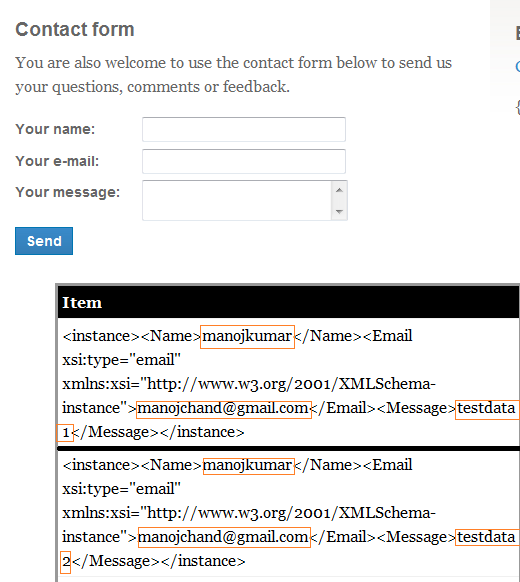
What happens when I edit the form in edit mode -
(I) Adding a new field and then retrieving the data-
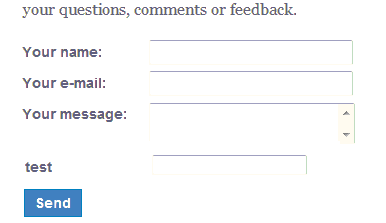

Adding new field column and then inserting a record results in new empty field node added to xml for old data and new data node will contain the value.
(II) Removing the field and then retrieving the data -

Removing the field column from xForm and then retrieving the data results in removal of the field specific node from xml. But the data previously posted is still available in the store you can retrieve it. I retrieved it again adding the same field column in the form. You can also retrieve it programmatically using XFormData class.
like retrieving and inserting we can do the other CRUD operation using XFormData class.
Other feature -
personalization can be used with xForm:-

Integration of xForm with other EPI Server feature -
You can use xForm as dynamic content. Mixing XForm, Dynamic data content and visitor group features you can created powerful forms.
The other thing I wanted to do is integrate xForm and globalization feature. I wanted a regional page having xForm with field called “country” that has a default value like “UK” in case of “en-gb” page. Unfortunately I was not able to set the default values to text field in xForm in edit mode.
Comments