


Color Palette for Forms
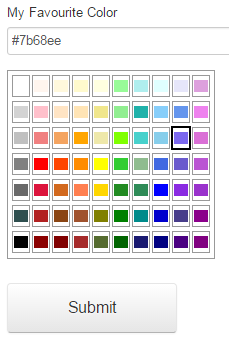
There are few blogs have already been written to extend new EPiServer forms. This blog is to extend the concept of customization in Form and providing an element to let the users select a color from color pallete with four easy steps.
Steps:
1. Extend a text element
using System.ComponentModel.DataAnnotations;
using EPiServer.DataAbstraction;
using EPiServer.DataAnnotations;
using EPiServer.Forms.Implementation.Elements;
using EPiServer.Shell.ObjectEditing;

namespace AlloyDemoKit.Forms
{
    [ContentType(
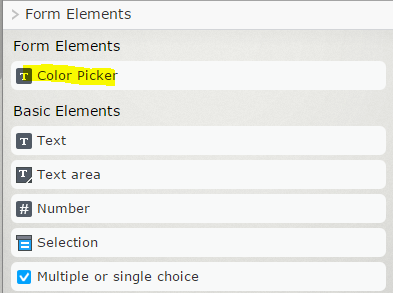
        DisplayName = "Color Picker Textbox",
        GroupName = "Form Elements",
        GUID = "70740CE9-7FEE-4582-B224-BAFC0D926889")]
    public class ColorPickerElementBlock : TextboxElementBlock
    {
    }
}
2. Add language elements
<languages>
  <language name="English" id="en">
    <contenttypes>
      <colorpickerelementblock>
        <name>Color Picker</name>
        <description />
      </colorpickerelementblock>
    </contenttypes>
  </language>
</languages>
3. Create a view (Views/Shared/Blocks/ColorPickerElementBlock.cshtml
@model AlloyDemoKit.Forms.ColorPickerElementBlock
@using EPiServer
@using AlloyDemoKit.Models.Pages.Models.Blocks
<link rel="stylesheet" href="//ajax.googleapis.com/ajax/libs/dojo/1.10.4/dijit/themes/claro/claro.css" media="screen">
<script src="//ajax.googleapis.com/ajax/libs/dojo/1.10.4/dojo/dojo.js" data-dojo-config="isDebug: 1, async: 1, parseOnLoad: 1"></script>
<script>
    require(["dijit/ColorPalette", "dojo/dom", "dojo/on", "dojo/query", "dojo/NodeList-dom", "dojo/domReady!"], function (ColorPalette, dom, on, query) {
        var node = dom.byId("@Model.FormElement.Guid");
        var myPalette = new ColorPalette({
            palette: "7x10",
            onChange: function (val) {
                node.value = val;
                query("#placeHolderForColorPalette").style("display", "none");
            }
        }, "placeHolderForColorPalette");
        query("#placeHolderForColorPalette").style("display", "none");
        on(node, "focus", function () {
                query("#placeHolderForColorPalette").style("display", "");
                myPalette.startup();
        });
   });
</script>
<div class="Form__Element FormTextbox" data-epiforms-element-name="@Model.FormElement.Code">
    <label for="@Model.FormElement.Guid">
        @Html.Translate("/colorpickerelementblockelements/selectcolor")
    </label>
    <input type="text" name="@Model.FormElement.Code" class="FormTextbox__Input" id="@Model.FormElement.Guid" @Model.FormElement.AttributesString />
    <span data-epiforms-linked-name="@Model.FormElement.Code" class="Form__Element__ValidationError" style="display: none;">*</span>
    <div><span id="placeHolderForColorPalette"></span></div>
</div>
4. Other language elements
<colorpickerelementblockelements>
<selectcolor>My Favourite Color</selectcolor>
</colorpickerelementblockelements>
Ready to go
Scholarly articles:
Building out a custom form element with the new Episerver forms
Creating custom form elements in Episerver.Forms
Custom EPiServer Forms field
Jan 19, 2016
Comments