

Filter Commerce SEO Tab Properties by Language
Based on CMS 6 R2 and Commerce R2 SP1
Recently Jacob Khan posted a blog and code for filtering the EPiServer Commerce product catalog /properties/metadata by language. This is of course a fabulous enhancement and one that many customers will likely want to utilize to provide an improved user experience when editing the catalog. I thought I’d take advantage of my colleague's good work and add the same for the SEO tab since it also contains properties differentiated by each language.
In an ideal world I could have stolen the base of his code, implemented things in the same manner, and it simply would have worked. Unfortunately since the SEO tab contains child controls in a placeholder I actually had to think about it for a minute and write a few more lines of code. So much for just stealing from others and claiming glory in the blog post, even though that’s basically what I did, with a few extra bits of effort.  Anyway, alas it does indeed work. I also created a language selector helper class for the dropdown so the two tabs in the UI can share this functionality. The code is commented out with explanation where it differs from the core Commerce code. If you intend to use it in a production environment you’ll probably want to remove this.
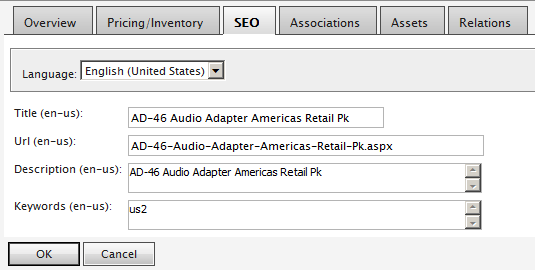
Note that just like Jacob's code, if you change languages in the drop down without saving, the previous languages updates will be lost. So, in the current state you should select the OK button with each language change. Some may not like this experience and you’re more than welcome to provide additional updates to this code and feed it back into the community.  There’s different ways this could be handled but I’ll let you decide…unless a find a few more cycles to burn and tackle it myself.
Get the code here. It includes Jacob's code as well as my own. I’ve also included an updated ReadMe.txt file for the setup steps.
For a good introduction to customizing EPiServer Commerce, check out Roger Cevung's article.
Please note, this is intended as a starting point for you to customize for your project needs. This code is provided “as is” without warranty or guarantee of operation. Use at your own risk. Good luck and enjoy!
Fabulous!