

Commerce Manager filter meta properties by language
I was recently asked by a Partner to assist them in an issue they have with EPiServer Commerce and multiple languages. They run around 15 languages and have around 10 xhtlm meta properties on a single product/sku. This means that every time they are editing a sku they see all the language properties.
I made a simple little drop down list that switches between the languages and only loads the classes needed for each language. This makes it easier for the editors when working with multiple languages.
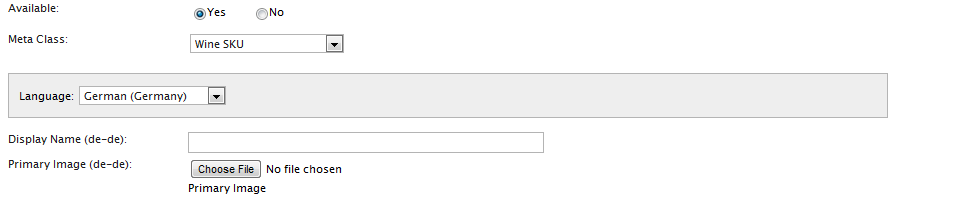
Meta fields will be fetched as they are needed depending on the language. The loading time is decreased and it is easier to understand for editors. However if you are moving between languages without saving nothing is stored in memory so remember to save in between changing languages.
The plugin needs some configuration but is real easy to use. Since it is added to the eCommerceFramework and not the site there is no epimodule installation. Of course, these are the kinds of things EPiServer is considering for enhancements in a future release. In the mean time you can get started with this add-on by downloading the code and configuring it. Roger Cevung has also written an article on how to extend the commerce manager here.
In the zip there is a readme that will help you install the feature. Please add comments to the blog for questions and ideas.
If you have problems with the compiling because it cannot find the usercontrols simply remove them from the designer files and add them manually to the codebehind.
This plugin works for CMS 6 R2 with Commerce 1 R2 SP1
Thanks to Nansen for testing this out
This is really good solution for localisation in Commerce Manager. Could it be possible to apply all languages based meta fields?
Nice! Link to download please?
@Steve Sorry my live writer plugin wasnt working. I added it again. @Dzung Le what do you mean all languages? So an option to show all languages in the drop down? yes it is a rather simple feature to add
Awesome add-on! Downloading...
I mean beside languages for product, in Commerce Manager there are some other area which depend on language as well
Brilliant! It works like a charm.
VERY nice!!!
Implemented on my Demo site..
Works like a charm...!!
This will also work on R2, as long as you remove the NameLengthValidator, or use another string than Catalog_Catalog_Name_TooLong (since it looks like it is added in SP1? ).