
The ultimate EPiServer Windows Azure website (part 1)
I start by creating a new project with the help of the updated version of EPiServer CMS Visual Studio Extension (version: 7.6.0.73) and because I will later add asynchronous version of logging I selected Framework 4.5.
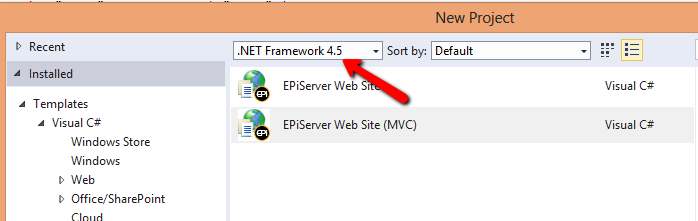
All worked out fine a my new solution were created that build ok. I noticed a couple of changes I liked in this version of Extension.
1: Episerver.config and episerverframwork.config is gone and included in web.config
This is good since it easier to do transformations and now these sections (files) is so small that it is ok. Before this was not recommended to do since EPiServer made changes in episerverframwork.config for every computer running the site, and it is not good to have a site that do changes in web.config on the fly. This is now gone thankfully.
2: Below the AppData directory a database file were created and in web.config the connection string pointed to this file.
This is great and helps to get coding fast and removes the dependency to have a local sql server installed on the development machine.
One boring thing I discovered was that the projected was not created with framework 4.5, only with framework 4.0 and all nuget package installed with 4.0 version.
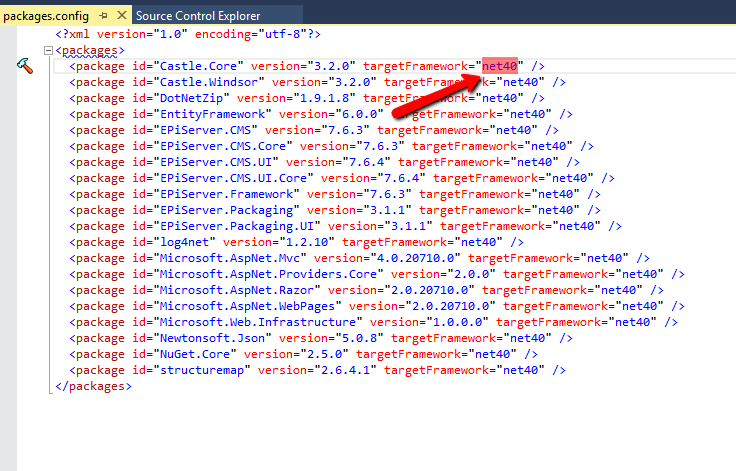
This sucks because I really need 4.5 and this makes me wonder if EPiServer not supporting 4.5 yet.
So the first things I need to do before doing any coding at all is
1. Change the framework on the project to 4.5
2. Update all nuget package to point to 4.5 instead
This was easier said than done and after a while I ended up with deleting the whole the project and started over doing this (Must be done in this order!):
1. Change the framework on the project to 4.5
2. Update all EPiServer nuget packages
3. Update package Microsoft.AspNet.Mvc
4. Update package EntityFramework
5. Update package Castle.Windsor
6. Update package Castle.Core
7. Some of the packages can’t be upgraded since there are no updated version of EPiServer supporting that. These packages are:
a. DotNetZip
i. Error: Update-Package : Updating 'DotNetZip 1.9.1.8' to 'DotNetZip 1.9.2' failed. Unable to find a version of 'EPiServer.CMS.UI.Core' that is compatible with 'DotNetZip 1.9.2'.
ii. Run instead: Update-Package –reinstall DotNetZip
b. Newtonsoft.Json
i. Error: Update-Package : Updating 'Newtonsoft.Json 5.0.8' to 'Newtonsoft.Json 6.0.2' failed. Unable to find a version of 'EPiServer.Framework' that is compatible with 'Newtonsoft.Json 6.0.2'.
ii. Run instead: Update-Package –reinstall Newtonsoft.Json
c. NuGet.Core
i. Error: Update-Package : Updating 'NuGet.Core 2.5.0' to 'Nuget.Core 2.8.1' failed. Unable to find versions of 'EPiServer.Packaging, EPiServer.Packaging.UI' that are compatible with 'Nuget.Core 2.8.1'.
ii. Run instead: Update-Package –reinstall NuGet.Core
d. Structuremap
i. Error: Update-Package : Updating 'structuremap 2.6.4.1' to 'structuremap 3.0.2.115' failed. Unable to find a version of 'EPiServer.Framework' that is compatible with 'structuremap 3.0.2.115'.
ii. Run instead: Update-Package –reinstall structuremap
e. log4net
i. Update-Package : Updating 'log4net 1.2.10' to 'log4net 2.0.3' failed. Unable to find a version of 'EPiServer.Framework' that is compatible with 'log4net 2.0.3'.
ii. Run instead: Update-Package –reinstall log4net
8. When doing a update package after you have changed framework version it will automatically install the updated version with framework 4.5 but for some packages there are no updates so these have to be reinstalled. Do it in this order:
a. Update-Package –reinstall Microsoft.AspNet.Providers.Core
When doing this, you will get this errormessage: “One or more packages could not be completely uninstalled: EntityFramework.6.1.0. Restart Visual Studio to finish uninstall.” Ignore that and restart Visual Studio after you are done.
b. Update-Package –reinstall Microsoft.Web.Infrastructure
9. Include the directory modulesbin in the solution (need it for more simple deployment)
10. Include the mdf-file (in AppData) in the solution (need it to simplify get latest deployment)
Wow, now we are done to start coding, nuget is a great tool but also a tool that can be very annoying and buggy! Here is a diagram over how all nuget packages in this empty solution is related to each other.

In the next part of this blog I am actually going to do some coding, be back in a couple of weeks. Please feel free to comment your thoughts on this!
.NET 4.5 is supported.
I would be somewhat careful in forcing updates of dependent packages to versions that are not set as compatible, especially when it's a major version change. Chances are that there could be incompatibility problems. Do you really need the absolute latest versions of all those packages?
I totally agree with you Henrik. I would never force a update on non compatible packages, that's why I did a update with reinstall instead of these packages, just for them to be installed with framework 4.5, not framework 4.0.
The packages I did got to update I need because I will do the site in MVC5 and I will use async await in Entityframwork.
Thanks Fredrik, good to know.
Looking forward to your posts. In the next version of the VS extension we have fixed so that if you select .NET 4.5 we honor that, hope to get it out soon.
Sounds good Per and a little tip is that the extension didn't see that there were a upgrade last time, I had to do a manual uninstall / install to get the latest version.
Thanks for the feedback!
Waiting for next post
Thanks Saravn. It will be up in a couple of weeks, now in Sweden we have this holiday on the first of may with a day of on the Friday so not much will be done next week :)