
EPiServer Workflow Replacement : Step 1–Explanation and Disabling Edit Tab
This is the first of a few different posts I’d like to write about EPiServer Workflow, its limitations, and how we’ve provided a custom workaround that seems to work pretty well for our company.
For all intents and purposes, EPiServer workflow functions fine out of the box..but it has some limitations that prevent us from using it here internally, namely, pages cannot be rejected.
Now I know the official party line is that the provided workflows are just a template for how workflow can be set up, and I don’t want to spend too much time pointing out a flaw in the application, but there is no way to set a page to rejected. It just doesn’t work.
Try it yourself if you do not believe me.  The Enumeration for VersionStatus in CMS 6 (http://sdk.episerver.com/library/cms6/html/T_EPiServer_Core_VersionStatus.htm) remains the same as it does for CMS 5 – clearly showing a VersionStatus.Rejected…
…so by definition we should be able to do this:
PageProviderTools PPT = new PageProviderTools();
PPT.SetThisPageStatus(pageToEditNow, VersionStatus.Rejected);
-----------------------
public class PageProviderTools : LocalPageProvider
{
public void SetThisPageStatus(PageData pageToEdit, VersionStatus versionStatus)
{
SetPageStatus(pageToEdit, versionStatus);
}
}
….but it doesn’t work. I’ve even gone into the database and set the table manually to “rejected” – which only ends up displaying the text label “Comments” on a page’s version status; leading me to believe that although the SDK provides for a VersionStatus.Rejected, it was never actually implemented.
If we have editors who request that an item be published and the approvers determine that the item is not ready to be published, there is no method for the approver to reject the requested version. This leads to a lot of “Ready to Publish” versions sitting in the CMS, which leaves the application cluttered and difficult to determine which version is actually the correct version. This might not be a big deal in smaller installations, but when you have 40 global content authors editing 12 different language versions of the same site…it quickly becomes a hassle.
So…a new method was needed, and this series of posts will explain how we did it.
----------------------------------
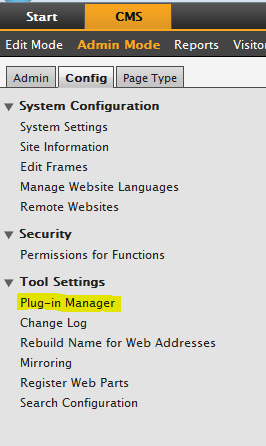
The first thing we do when setting up workflow for our environment is to disable the workflow tab provided by EPiServer. We do this by going to Admin Mode, selecting the “Config” tab, and then selecting “Plug-in Manager”
Then we select “EPiServer User Interface” from the list of options available,

select the “Overview” tab,
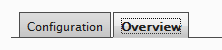
…and uncheck the “Workflow (EditPanel)” option

This prevents the default EPiServer workflow tab from appearing in Edit Mode. In the next post, we’ll write a GuiPlugin that replaces this tab with our own “Workflow” implementation….
Comments