
Users statistics gadget
After installing the EPiServer CMS 6 CTP I saw the Gadget contest on EPiSerer world. Here is my contribution to the contest. The users statistics gadget.
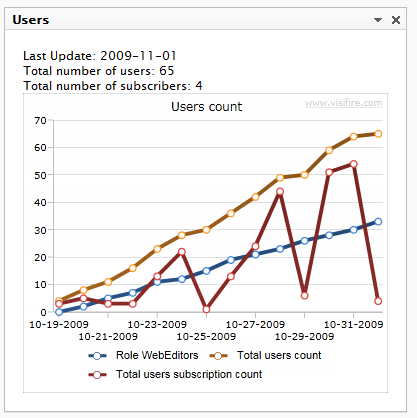
It simply displays a chart with the number of users and subscription users you have registered on the site. It’s also possible to show a chart of the users in a specific role. All settings is done in the Edit menu.
The chart is created in SIlverlight (Visifire). The Silverlight application accesses the users statistics from a WCF service. All wcf configurations is in the Gadget web.config. And therefore no need to update the web project’s web.config.
Configuration
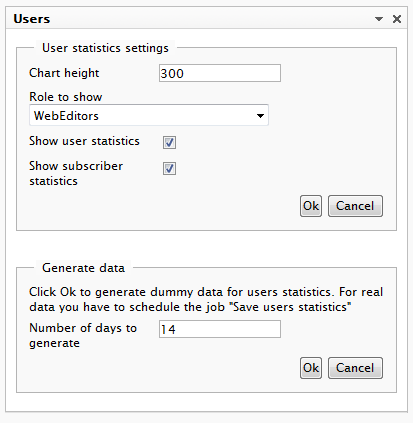
By clicking the Edit in the menu you will see some configuration options. You can choose to show statistics for one role of all roles in the RoleMembershipProvider.
Save history data
The history data is stored in the DynamicDataStore. I have created a scheduled job which should be executed once a day.
As seen in the image above I have made it possible to generate dummy data for the statistics. This is just for demo purposes.
Installation
If you have problems with the Silverlight chart. Add mime type to IIS: .xap application/x-silverlight-app. Configuring IIS for Silverlight Applications.
The clientaccesspolicy.xml must be placed in the root of your project to get the Silverlight wcf reference running. This is done by the installer below.
Live writer problem. The first link is the installer.
The tags disappeared when editing the blog entry in Live writer.