Aug 21, 2009
visibility 6817
star star star star star
(0 votes)

File Manager and Missing Thumbnails

Recently I encountered a problem whereby viewing thumbnails for images within EPiServer's file manager would not render correctly.
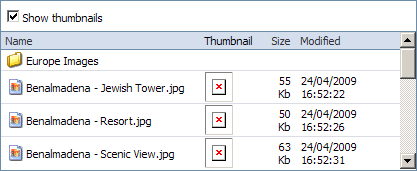
image

After much investigation as to why this problem occurred, I found that the issue was due to incorrect permissions on the '/util/temp/thumbcache/' folder within the site's application folder.

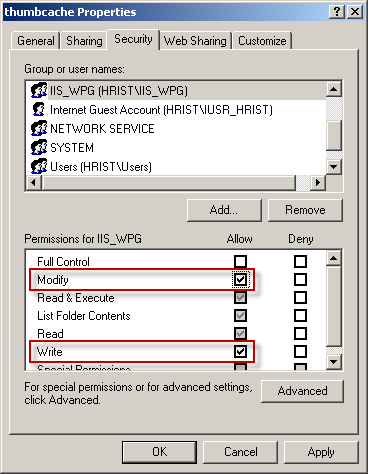
In order to correct the problem, 'IIS_WPG' needs to have modify and write permissions on the said folder. To grant modify permissions, right click on the thumbcache folder, select properties and navigate to the security tab. Here you will be able to add IIS_WPG to your permissions list and select modify rights for that group.
image

Aug 21, 2009

Comments

error Please login to comment.
Latest blogs
Add more scheduled job settings from the Optimizely CMS 12 admin UI -- with OptiScheduledJob.ExtraParameters

  Optimizely (EPiServer) CMS 12 ships a great scheduled-jobs framework, but it has one frustrating gap: a job has nowhere to store its own...

Binh Nguyen Thi | Jun 25, 2026

Automated Search & Navigation to Graph Migration with Claude Code

A Claude Code plugin that scans your S&N codebase, applies Graph SDK transformations, and validates the result. Install once, run one command. CMS ...

Connor Fortin | Jun 24, 2026

Migrating from Find to Graph: Lessons Learned from a Real CMS 13 Project

While migrating a search solution from Optimizely Search & Navigation (Find) to Optimizely Graph in CMS 13, I encountered several issues that were...

Binh Nguyen Thi | Jun 24, 2026

Optimizely: Upgrade Opti-ID and .NET 10 in CMS 12

Many Optimizely customers are planning their roadmap around a future migration to Optimizely CMS 13. As a result, upgrades such as Opti ID adoption...

Madhu | Jun 23, 2026 |