
Strongly typed property access – Part one
This is a way of mapping EPiServer properties so they can be accessed with strongly typed C# code. This allows for safer code and easy refactoring.
The normal procedure of accessing properties in EPiServer is done by specifying a string as the propertyname something like this.
1: pageData.Property.Get("myproperty")
The problem is that any given propertyname, no matter if it really exists or not will pass without yielding a compiler error, and if not a runtime exception will be thrown. For the same reasons refactoring is not a very delightful task either.
Would it not be great if the compiler could tell us if we typed a property that does not exist or by mistake typed a bad name? Or how about having intellisense handing us the available properties directly? Actually, there is a way to get all this.
Mapping the properties
A pagetypes properties is mapped to a C# class like this.
1: public class MyPageProperties : PropertiesBase
2: {
3: public PropertyString MainIntro { get; set; }
4: public PropertyString MainBody { get; set; }
5: }
The base class PropertiesBase includes basic properties common for all pagetypes and the EPiServer PropertyDataCollection and looks like this.
1: public class PropertiesBase
2: {
3: public PropertyString PageName { get; set; }
4: public PropertyString Heading { get; set; }
7: public PropertyDataCollection Properties { get; set; }
8: }
Accessing the mapped properties
To access the mapped properties we create a generic extensionmethod on the PageData object where we provide a property mapping type.
1: public static PropertyData GetProperty<T>(this PageData currentPage, Expression<Func<T, PropertyData>> expression) where T : PropertiesBase
2: {
3: var methodExp = (MemberExpression)expression.Body;
4: return currentPage.Property.Get(methodExp.Member.Name) ?? currentPage.Property[methodExp.Member.Name];
5: }
This method takes a lamda expression as argument to allow for some static reflection, wich makes it possible to access the properties in a strongly typed way.
Note that to optimize performance pageData.Property.Get(“myproperty”) is used in the first place to avoid fetching dynamic properties. If we really asked for a dynamic property pageData.Property[“myproperty”] is used as fallback wich do fetch dynamic properties. Read more on this in the SDK under Read-Only PageData Cache.
It will now be possible to access the mapped properties in a strongly typed way and with assistance of the intellisense on any PageData object like so.
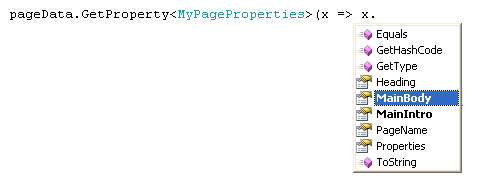
We could stop right there but to avoid providing the property mapping type each time we need to access a property on CurrentPage, we create new generic base classes based on the standard classes TemplatePage, SimplePage and UserControlBase to take care of that mapping. Example is provided for TemplatePage, the other base classes should look the same.
1: public class TemplatePage<T> : TemplatePage where T : PropertiesBase
2: {
3: public PropertyData GetProperty(Expression<Func<T, PropertyData>> expression)
4: {
5: return CurrentPage.GetProperty(expression);
6: }
7: }
Then in our template page we use TemplatePage<T> as our base class like this.
1: public partial class MyPage : TemplatePage<MyPageProperties>
2: {
3: protected void Page_Load(object sender, EventArgs e)
4: {
5: var mainBody = GetProperty(x => x.MainBody).ToString();
6: }
7: }
A property mapping type is now provided and GetProperty() on CurrentPage can thus be used without providing the property mapping type each time we need to access a property.
Now, with quite a small effort, we have strongly typed property access thats way more safe and refactorfriendly then using “magic strings”.
Have your pagetypes built based on your property mappings
By now some of you might think that would it not be nice if all I had to do was to deal with the property mapping classes and have the pagetypes built automatically based on them. That would also assure that the mapped properties actually exist in EPiServer.
This is exactly what my colleague Mikael Nordberg will cover shortly in Strongly typed property access - Part two
Comments