
All pages available using Linq and DDS
I have been playing with some code that saves every published page into a Dynamic Data Store table. This is because I want to use Linq against that table and retrieve EPiServer pages.
I know there is a Querying EPiServer PageData using LINQ but I wanted to try out the DDS and check what kind of performance it gave.
I assume that all properties with the same name is the same property. If you are using a strong typed page type this shouldn't be a problem.
What I do first is to loop over all page types and make a store definition based on all properties those page types have. This I do on first access against the Store. and is done by providing a Dictionary<string, Type> with name and type.
- if (storeDef == null)
- DynamicDataStoreFactory.Instance.CreateStore(StoreName, storeBagType);
- else
- {
- if (added)
- {
- storeDef.Remap(storeBagType);
- storeDef.CommitChanges();
- }
- }

Then it was time for using the datastore. One cool thing about the DDS is that even you have created a store with string,type dictionary you can access it with a class. The only thing you need is that the propertynames are the same.
So i made myself a class that contains those properties
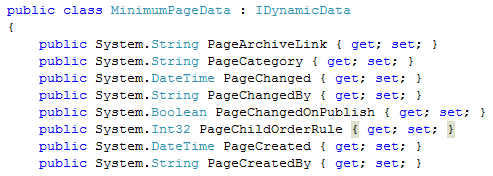 and can use that to create strong typed selects from the store.
- public class AllPagesStore<T> where T : MinimumPageData
- {
- public static string StoreName { get { return "Itera.AllPagesStore.AllPages"; } }
- public static IOrderedQueryable<T> AllPages()
- {
- return DynamicDataStoreFactory.Instance.GetStore(StoreName).Items<T>();
- }
and then I made a class that inherits from my typed store method class with the EPiServer built in properties with Page prefix names
- public class AllPagesStore : AllPagesStore<MinimumPageData>
- {
- public static DynamicDataStore Store
- {
- get
- {
- return DynamicDataStoreFactory.Instance.GetStore(StoreName);
- }
- }
There is no ACL checks here, but the helper method that converts a query to a PageDataCollection can do that
- public static PageDataCollection GetPages(IQueryable<T> query, int maxCount,AccessLevel access)
- {
- var pages = new PageDataCollection();
- foreach (var row in query)
- {
- var rowData = row.ToPropertyBag();
- var page = EPiServer.DataFactory.Instance.GetPage(
- PageReference.Parse((string)rowData["PageLink"]),
- new LanguageSelector((string)rowData["PageLanguageBranch"])
- );
- if (page != null && page.QueryDistinctAccess(access))
- {
- pages.Add(page);
- if (pages.Count >= maxCount)
- break;
- }
- }
- return pages;
- }
and even only return those pages we are interested in. Which is a huge problem with FindPagesWithCriteria, In the foreach here there will be executed a database call to retrieve the row from the database. I’m not particular happy with this implementation of the DDS. I would like to have a method to retrieve a given number of rows in one go. Paul Smith and I have agreed to disagree on this issue thou.
I first tried to have one store for each language and using the PageGuid as the guid in the store. That actually worked, but got a bit messy since you needed to know what store you wanted to access.
When I save to pages into the store I find the parents path and add a , before and after the PageCategory. this is to more easy do query’s against categories.
This means that we can do all kind of Linq searches
- var query = from page in AllPagesStore.AllPages()
- where
- page.PageTypeID == pageTypeID &&
- page.PageParentLinks.Contains("|" + startSearchLink + "|")
- select page;
- var query2 = from page in AllPagesStore.AllPages()
- where
- (
- page.PageCategory.Contains(",1,")
- ||
- page.PageCategory.Contains(",2,")
- )
- &&
- (
- page.PageTypeID == "3"
- ||
- page.PageTypeID == "4"
- )
- orderby page.PageStartPublish descending
- select page;
Have uploaded some files in the code section, and as you may see this is work in progress code :)
AttachEvents.cs
Will update the big table with new values when a page is published or moved/deleted
Status.aspx
Is a admin plugin to start indexing all pages and add them to the big table. this will also show all properties that are available, and show those properties and pagetype where there are indifference.
AllPagesStore.cs
Is the class where you can access the store
MinimumPageData.cs
is a class with all the Page properties
Have not gotten around to test performance yet, but the ability to query against all fields and only retrieve the 5 latest should outperform the FindPagesWithCriteria. at least when we are looking at a big record set.
I think that EPiServer CMS6 should have something like this build in, and I think there is to long for some of us to wait for CMS7 that are promised Linq support on the pages.
Gosh, one of those examples seems so familiar... :-)
We work with a lot of corporate clients, and they're still very comfortable with SQL. I've often thought about doing a page-to-DB-table mapping, so pages are dropped into flat SQL tables with strongly typed columns for each property.
It's not nearly as extensible and cool as this, but for corporate developers with a strong preference for SQL, it would play really well and likely help us in sales situations. To be able to tell a CIO that his developers can query the repo with normal SQL would be a great selling point.
I copied it of the forum post :)
Good point Deane
Had not thought about that this code makes it easy to select pages from a normal query, to use in other system.