
Just for fun
Deane Barker (@gadgetopia) tweeted about some code he had done just for fun to extend the PropertyDataGet handler. The concept is cool, and you should take a look @ http://pastie.org/1493264
But the problem is of course that its not strong typed, so we have problems with magic strings. But sometimes you can live with that, and Deane code is a nice extension if you can find a use :)
You can extend properties with extension methods. Those will be strong typed from the backend code. So I made myself a method that found every extension methods that worked on PropertyData or PageData and returned PropertyData or string that exists in the dll’s and makes them available for use thou the PropertyDataCollection.GetHandler.
The trick Deane used to exclude assembly's that started with System work great.
- public static void Initialize(int optionFlags)
- {
- extendProperties = new Hashtable();
- extendPageData = new Hashtable();
- HelpText = new StringBuilder();
- AddText(HelpText, "<ul>");
- foreach (Assembly assembly in AppDomain.CurrentDomain.GetAssemblies())
- {
- // This cuts the number of assemblies to be iterated by about 75%. If your assembly starts with "System" for some reason (really bad idea, for the record), you need to remove this.
- if (assembly.FullName.StartsWith("System"))
- continue;
- foreach (Type type in assembly.GetTypes())
- {
- foreach (MethodInfo method in type.GetMethods())
- {
- bool isExtension = method.IsDefined(typeof(ExtensionAttribute), true);
- if (isExtension)
- {
- var parameters = method.GetParameters();
- Add<PropertyData, PropertyData>("PropertyData [PropertyData]:", HelpText, method, parameters, extendProperties);
- Add<PropertyData, string>("string [PropertyData]:", HelpText, method, parameters, extendProperties);
- Add<PageData, PropertyData>("PropertyData [PageData]:", HelpText, method, parameters, extendPageData);
- Add<PageData, string>("string [PageData]:", HelpText, method, parameters, extendPageData);
- }
- }
- }
- }
- AddText(HelpText, "</ul>");
- PropertyDataCollection.GetHandler = DiscoverExtensionMethods.GetProperty;
- }
- public static string TimeAgo(this PropertyData prop)
- {
- TimeSpan dif = DateTime.Now - ((DateTime)prop.Value);
- if (dif.Days > 0)
- return string.Format("{0} day{1} ago ", dif.Days, dif.Days == 1 ? "" : "s");
- else if (dif.Hours > 0)
- return string.Format("{0} hour{1} ago ", dif.Hours, dif.Hours == 1 ? "" : "s");
- else if (dif.Minutes > 0)
- return string.Format("{0} minute{1} ago ", dif.Minutes, dif.Minutes == 1 ? "" : "s");
- return string.Format("{0} second{1} ago ", dif.Seconds, dif.Seconds == 1 ? "" : "s");
- }
can be used with PageCreated like this
- CurrentPage.Property["PageCreated"].TimeAgo();
or
- PageCreated=<EPiServer:Property ID="PageCreated" PropertyName="PageCreated:TimeAgo" EnableViewState="false" runat="server" />
and will result in code like this
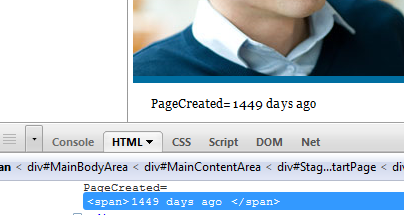
The extension method that exists in the demo template

can also be used like this
- GetPreviewText=<EPiServer:Property ID="Property2" PropertyName="GetPreviewText(100)" EnableViewState="false" runat="server" />
and will render like this

I even made myself a help function, so if you use propertyname !help! you will get an overview of methods that exists
- Help=<EPiServer:Property ID="Property1" PropertyName="!help!" EnableViewState="false" runat="server" />
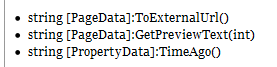
Code is available in the code section
and any ideas where this can be used would be appreciated :)
Comments