


NHunSpellchecker for EPiServer CMS - Now on NuGet
Back in August of 2010 Ruwen Jin did a pretty cool implementation of NHunSpellchecker for TinyMCE in EPiServer CMS. Because he needed some framework changes in the CMS to finish it, it never made it online. However with EPiServer CMS 6 R2 those changes are in place and I took the liberty of finishing his project and wrap it in a NuGet package for our EPiServer NuGet feed. If you are new to NuGet, you can learn more here.
You can install it directly from the EPiServer NuGet Feed or download the source here if you are interested. Note that NHunSpellChecker, HunSpellChecker and the individual language packs which this project is dependent on each come with their own open source licenses.
After you install it from the EPiServer NuGet feed into your web project, you need to create a custom setting for the spell-checker to be enabled on your XHTML fields. You do this by:
- Go to Admin mode
- Select the “Page Type” tab
- Click on “Edit Custom Property Types”
- Select XHTML String (in the bottom)
- Add a new setting. Give the setting a name and move the Spellcheck button from the “Miscellaneous” area to the place in the toolbar where you want it. Save the setting.
- Set it as Default.
You should now be ready to go! If you click the spellcheck button on any of the text fields in the editor it will highlight spelling mistakes and you can then select them to list suggestions.
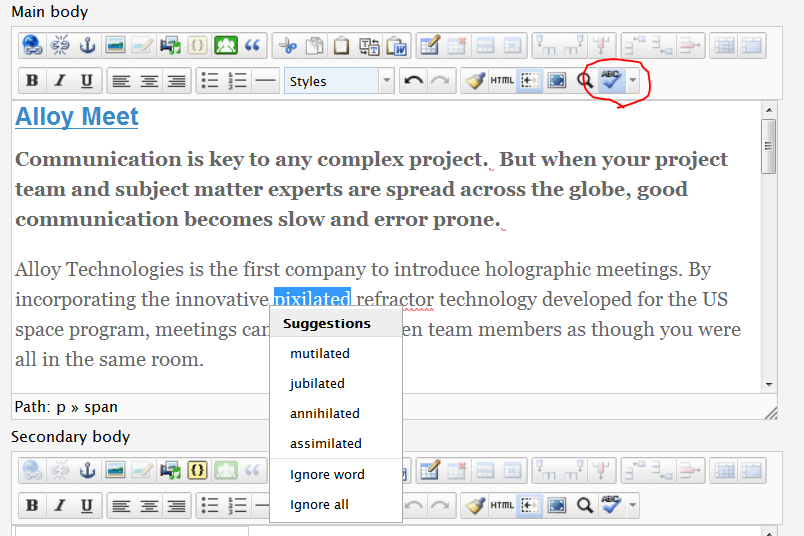
The spell checker uses open source dictionaries from Open Office. Find more here. To install them, make sure that the language is enabled in EPiServer CMS, copy the .aff and .dic files to a folder with the language ID under modules\NHunSpellChecker.
Enjoy!
Loving this!!!
Nice
However, I can't install it using NuGet.
PM> Install-Package NHunSpellSpellChecker
Successfully installed 'NHunSpellSpellChecker 0.0.9'.
Successfully uninstalled 'NHunSpellSpellChecker 0.0.9'.
Install failed. Rolling back...
Install-Package : Failed to add reference to 'Hunspellx64'.
At line:1 char:16
+ Install-Package <><><>< NHunSpellSpellChecker
+ CategoryInfo : NotSpecified: (:) [Install-Package], InvalidOperationException
+ FullyQualifiedErrorId : NuGetCmdletUnhandledException,NuGet.PowerShell.Commands.InstallPackageCommand
Any ideas?
Regards
/Fredrik
I have the same problem Fredrik. Is there a fix?
The package from EPiServer NuGet feed does not install.
(NuGet does not allow white-space in id)
I got it working by building my own NuGet from the source.
Here is what i did:
1. Download the source: http://world.episerver.com/PageFiles/104267/NHunspellCheckerEPiServerCMS6R2.zip
2. Move Hunspellx64.dll and Hunspellx86.dll to the lib folder.
3. Make the following changes to NHunspell.nuspec
- Remove the white-space from
- Change the line
to
4. Clean and build the project
The new NuGet package should now be in the folder: /NuGet/
Hope it helps :-)
Hi
Nice article! However, when I come to "move the Spellcheck button from the “Miscellaneous” area", I can't see it. Do I have to add a custom button for this somehow?
Cheers
Steve
PS - I also got the issue trying to install the NuGet package, but this worked OK after I installed the package updates.