
How to create a Page Type in code for EPiServer CMS 7
In EPiServer 7 CMS you can defined page types in code. In this blog post we cover how to create your first page type in this way.
Updated to EPiServer 7 CMS on 14.01.2013
This blog post was originally written for a preview version of EPiServer 7 CMS, but is now updated to the final release version.
A simple page type
A page type in EPiServer 7 CMS consists of two parts:
1. A page type class (.cs) that defines what properties the page should contain
2. A page template (.aspx) that renders the page and those properties.
Creating a page type class
Here is a simple page type class that defines our page type MyPage:
MyPage.cs
using System.ComponentModel.DataAnnotations;
using EPiServer.Core;
using EPiServer.DataAbstraction;
using EPiServer.DataAnnotations;
namespace EPiServer.Templates.Alloy.Models.Pages
{
[ContentType(DisplayName = "MyPage")]
public class MyPage : PageData
{
[Display(
Name = "My name",
Description = "",
GroupName = SystemTabNames.Content,
Order = 1)]
public virtual string MyName { get; set; }
}
}
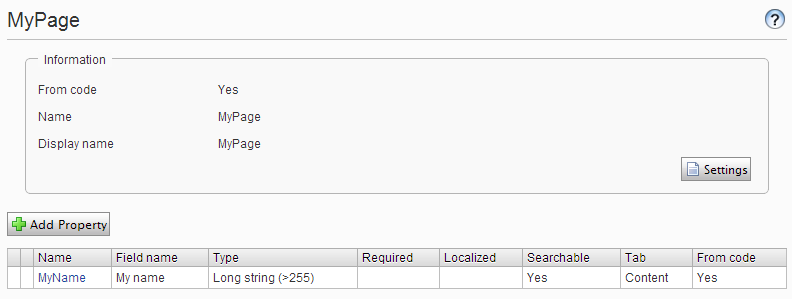
MyPage has a single string property called MyName.
Creating a page template
We now need a page template that can render pages of our page type MyPage.
MypageTemplate.aspx
<%@ Page Language="c#"
Inherits="EPiServer.Templates.Alloy.Views.Pages.MyPageTemplate"
CodeBehind="MyPageTemplate.aspx.cs" %>
<!DOCTYPE html PUBLIC "-//W3C//DTD XHTML 1.0 Transitional//EN"
"http://www.w3.org/TR/xhtml1/DTD/xhtml1-transitional.dtd">
<html xmlns="http://www.w3.org/1999/xhtml">
<head id="Head1" runat="server">
<title>My Page Template</title>
</head>
<body style="background-color: white;">
<form id="Form1" runat="server">
<div>
<h1>MyPage Template</h1>
My name is
<EPiServer:Property runat="server" PropertyName="MyName" />
</div>
</form>
</body>
</html>
In the code behind for the aspx file we set the connection between the page type class and the page template by setting TemplatePage<MyPage> (where MyPage is our page type class.)
MypageTemplate.aspx.cs
using EPiServer.Framework.DataAnnotations;
using EPiServer.Templates.Alloy.Models.Pages;
namespace EPiServer.Templates.Alloy.Views.Pages
{
[TemplateDescriptor(Path = "~/Views/Pages/MyPageTemplate.aspx")]
public partial class MyPageTemplate : EPiServer.TemplatePage<MyPage>
{
}
}
Using our new page type
After building the project and starting our EPiServer 7 site again we will see the new page type in admin mode:
The page type is also available in edit mode when we click create a new page:

(If you are using the Alloy demo and can’t see the MyPage as a page type when you create a new page, try creating a new page under the “Alloy Track” page instead as the start page has some restrictions set)
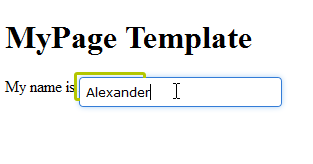
Lets create a new page of the type MyPage and enter “Alexander” into the MyName property:
After we publish the page the visitors will see this page:

That was how to create your first page type in EPiServer 7 from code. The next step is to create a simple block type.
Hi Alexandar,
Its nice article, We have two different offices on two different locations and both teams use TFS and check in the code togather. What will be the best way as if one developer creates some page type and enter data for that same page with data should also be available in next office?
Regards
Khurram
Hi Khurram,
That is a difficult problem. You will need to have a schedule for when people can commit changes to page and block types, and get everyone to be on the same version.
Hi,
There is a nice article about synchronization of typed models http://world.episerver.com/Blogs/Per-Bjurstrom/Archive/2012/10/Synchronization-of-typed-models/
Hello, do you know any article related to pagetypebuilder functionality equivalent in epi7?
Regards,
Hi Alexandar,
I am new to EPI, and to be very frank don't know the abc of EPI, could you please guide me to some learning source, where some step by step learning course is available.