Alexander Haneng
Feb 14, 2012
visibility 2844
star star star star star
(0 votes)

EPiImage 2.9 Released

The main feature of this release is the addition of image rotation to EPiImageResizer as well as some important bug fixes.


Image rotation

I am currently working a project where we have thousands of product images. We soon discovered that the graphic design shows the products both standing up and on its side. We where already using EPiImageResizer to resize the product images, so adding this functionality to the control made a lot of sense.
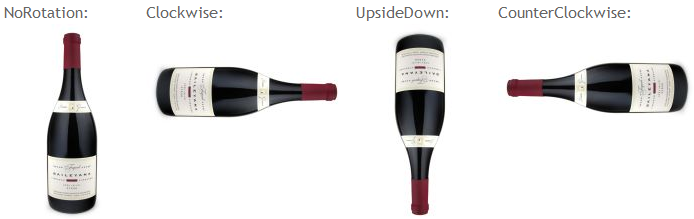
image


Usage:

<EPiImage:EPiImageResizer ID="EPiImage" PropertyName="EPiImageProperty"
Rotate="Clockwise" Transformation="ScaleToFit"
Width="200" Height="200" runat="server" />

 

image


Important bug fix

The most important bug fix is #276. Due to an error in the XHTML serialization you would loose all images in an EPiImageGalleryProperty if any of the image descriptions or links contained a &. This has now been fixed.


Render empty alt attribute

EPiImageResizer will now create an empty alt attribute on the image tag if no alternative text has been provided. This is in compliance with the HTML 4.01 specification.


Download

To download the latest version of EPiImage visit the EPiCode page.


Posted by

Feb 14, 2012

Comments

Feb 14, 2012 01:11 PM

Great!

Andreas Nylin
Andreas Nylin Sep 13, 2012 05:05 PM

I'm trying to change the VPP for scaled images to "/Images/scaled" since we aren't using the globalfiles folder on the site. After I have added the

and to web.config the images are no longer scaled. Any ideas what I'm doing wrong?

error Please login to comment.
Latest blogs
Add more scheduled job settings from the Optimizely CMS 12 admin UI -- with OptiScheduledJob.ExtraParameters

  Optimizely (EPiServer) CMS 12 ships a great scheduled-jobs framework, but it has one frustrating gap: a job has nowhere to store its own...

Binh Nguyen Thi | Jun 25, 2026

Automated Search & Navigation to Graph Migration with Claude Code

A Claude Code plugin that scans your S&N codebase, applies Graph SDK transformations, and validates the result. Install once, run one command. CMS ...

Connor Fortin | Jun 24, 2026

Migrating from Find to Graph: Lessons Learned from a Real CMS 13 Project

While migrating a search solution from Optimizely Search & Navigation (Find) to Optimizely Graph in CMS 13, I encountered several issues that were...

Binh Nguyen Thi | Jun 24, 2026

Optimizely: Upgrade Opti-ID and .NET 10 in CMS 12

Many Optimizely customers are planning their roadmap around a future migration to Optimizely CMS 13. As a result, upgrades such as Opti ID adoption...

Madhu | Jun 23, 2026 |